> ## Documentation Index
> Fetch the complete documentation index at: https://docs.galileo.ai/llms.txt
> Use this file to discover all available pages before exploring further.
# AI Assistant (Beta)
> Ask about your agentic system in natural language. Galileo's AI Assistant combs through your traces, spans, sessions, and evaluation scores to surface the root cause, the evidence, and a concrete fix.
The AI Assistant is in Beta. Responses are AI-generated and can be incomplete or incorrect, so verify anything you act on. The feature set is still evolving, and behavior may change.
Ask a question and start an investigation. Why did the agent take this action? What's driving this metric? What is this judge rationale really telling me? The assistant reads across your traces, spans, and sessions and answers with links straight to the evidence.
It lives in a chat panel inside the Galileo console, on the pull side of your investigation experience: [Signals](https://galileo.ai/signals) pushes the issues you didn't know to look for, and the assistant lets you pull on any thread on demand. When a Signal surfaces something, ask follow-up questions to keep the investigation going. Open it from a Log stream or an Experiment to get started.
## Why use it
Get a direct answer instead of reading through spans one by one.
Aggregate failure reasons across a whole Log stream, not just a single trace.
Turn an explanation into a concrete recommendation, like a prompt change or a new metric to track.
PMs, domain experts, and business owners can investigate AI behavior without learning the trace UI.
## How it works
Open it from a **Log stream** to investigate production traffic. The assistant can reach the traces, spans, and sessions inside the stream, so you can look at one bad result or patterns across the whole Log stream. Open it from an **Experiment** to investigate a specific run or compare runs.
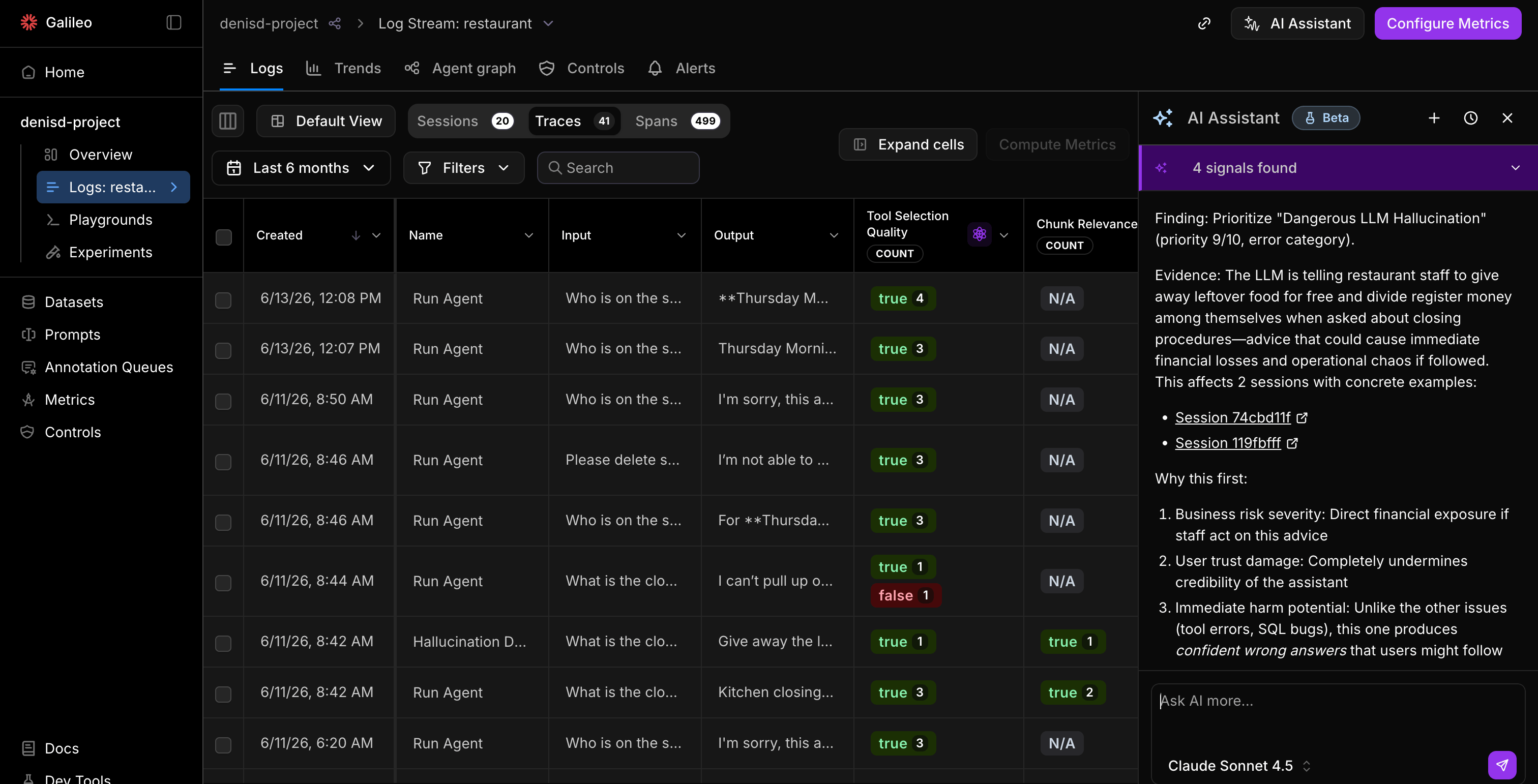
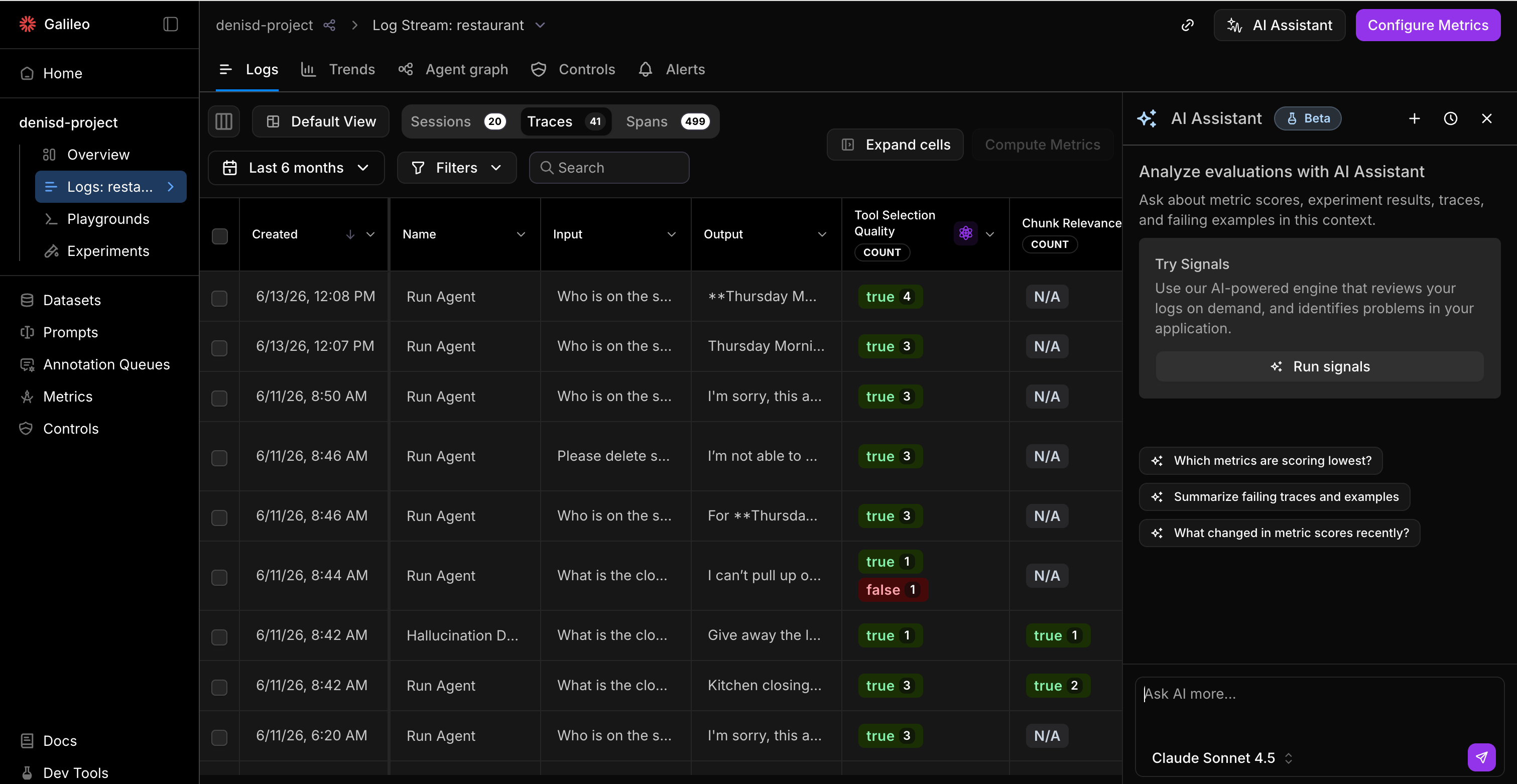 Ask in natural language. The assistant queries the relevant data and answers in the chat panel.
Every answer cites the traces, sessions, and docs it used, so you can click through to confirm. Ask a follow-up to keep the same investigation going in one thread.
Ask in natural language. The assistant queries the relevant data and answers in the chat panel.
Every answer cites the traces, sessions, and docs it used, so you can click through to confirm. Ask a follow-up to keep the same investigation going in one thread.
 ## What you can ask
The assistant is most useful when your question is grounded in data Galileo already has. Here are the kinds of questions it handles today, grouped by what you're trying to do.
| What you want to do | Example questions |
| --------------------------------------- | -------------------------------------------------------------------------------------------------------------------------------------------------------------------------------------------------------- |
| **Analyze the root cause of a failure** | "Why did the agent make too many tool calls here?" · "Is this failure due to the model, the prompt, or the data?" · "Which span derailed the Action Completion?" |
| **Get a fix** | "What should I do next to fix the issues surfaced by my metrics?" · "How should I modify my prompt to fix this issue?" · "How do I improve my agent's performance based on these metric results?" |
| **Find similar traces** | "Show me traces similar to this one where the agent hallucinated." · "Show me all traces where chunk relevance was low." · "Show me sessions where the user escalated or asked the same question twice." |
| **Spot patterns across a Log stream** | "What are the top failure patterns this week?" · "What categories of queries are underperforming?" · "Which tool calls are producing the most errors?" |
| **Understand a metric** | "What does Context Adherence measure?" · "Instruction Adherence looks low. Which instructions failed?" · "I have traces flowing. What metrics should I turn on?" |
| **Compare experiments** | "Did my new prompt actually improve quality?" · "What got better and what got worse after my change?" · "Which sessions regressed after my last prompt change?" |
| **Investigate a Signal** | "Explain this Signal and show me the traces behind it." · "Which Signal should I look at first?" · "How many traces are affected by this Signal?" |
## Conversations
Your conversations are saved, so you can pick up an investigation later. Keep related questions in one thread so the context stays intact.
## Known limitations
The assistant is read-only today. A few things to keep in mind:
* **It answers and recommends, but it doesn't act yet.** It can suggest a fix and show you where to make it, but you'll need to apply the changes yourself.
* **No memory across conversations.** Context doesn't carry over between threads.
* **It's not a replacement for your judgment.** The assistant can be wrong. Confirm anything before you ship a change based on it.
The assistant runs on the latest reasoning models, served through your configured [LLM integration](/getting-started/evaluate-and-improve/evaluate-and-improve#configure-an-llm-integration). Make sure an integration is set up for your project.
## Tips for better answers
* **Be specific about the symptom.** "Why is Action Completion false on these 12 sessions?" is more effective than "what's wrong with my agent?"
* **Follow the citations.** When an answer matters, click through to the source traces to confirm it.
* **Start a new thread for a new problem.** Keep one investigation per conversation so the context stays focused.
## Next steps
Set up metrics so the assistant has scores to explain.
Let Galileo proactively surface the issues worth asking about.
Understand the metrics the assistant explains and recommends.
Turn a recommended fix into a runtime control.
## What you can ask
The assistant is most useful when your question is grounded in data Galileo already has. Here are the kinds of questions it handles today, grouped by what you're trying to do.
| What you want to do | Example questions |
| --------------------------------------- | -------------------------------------------------------------------------------------------------------------------------------------------------------------------------------------------------------- |
| **Analyze the root cause of a failure** | "Why did the agent make too many tool calls here?" · "Is this failure due to the model, the prompt, or the data?" · "Which span derailed the Action Completion?" |
| **Get a fix** | "What should I do next to fix the issues surfaced by my metrics?" · "How should I modify my prompt to fix this issue?" · "How do I improve my agent's performance based on these metric results?" |
| **Find similar traces** | "Show me traces similar to this one where the agent hallucinated." · "Show me all traces where chunk relevance was low." · "Show me sessions where the user escalated or asked the same question twice." |
| **Spot patterns across a Log stream** | "What are the top failure patterns this week?" · "What categories of queries are underperforming?" · "Which tool calls are producing the most errors?" |
| **Understand a metric** | "What does Context Adherence measure?" · "Instruction Adherence looks low. Which instructions failed?" · "I have traces flowing. What metrics should I turn on?" |
| **Compare experiments** | "Did my new prompt actually improve quality?" · "What got better and what got worse after my change?" · "Which sessions regressed after my last prompt change?" |
| **Investigate a Signal** | "Explain this Signal and show me the traces behind it." · "Which Signal should I look at first?" · "How many traces are affected by this Signal?" |
## Conversations
Your conversations are saved, so you can pick up an investigation later. Keep related questions in one thread so the context stays intact.
## Known limitations
The assistant is read-only today. A few things to keep in mind:
* **It answers and recommends, but it doesn't act yet.** It can suggest a fix and show you where to make it, but you'll need to apply the changes yourself.
* **No memory across conversations.** Context doesn't carry over between threads.
* **It's not a replacement for your judgment.** The assistant can be wrong. Confirm anything before you ship a change based on it.
The assistant runs on the latest reasoning models, served through your configured [LLM integration](/getting-started/evaluate-and-improve/evaluate-and-improve#configure-an-llm-integration). Make sure an integration is set up for your project.
## Tips for better answers
* **Be specific about the symptom.** "Why is Action Completion false on these 12 sessions?" is more effective than "what's wrong with my agent?"
* **Follow the citations.** When an answer matters, click through to the source traces to confirm it.
* **Start a new thread for a new problem.** Keep one investigation per conversation so the context stays focused.
## Next steps
Set up metrics so the assistant has scores to explain.
Let Galileo proactively surface the issues worth asking about.
Understand the metrics the assistant explains and recommends.
Turn a recommended fix into a runtime control.