> ## Documentation Index
> Fetch the complete documentation index at: https://docs.galileo.ai/llms.txt
> Use this file to discover all available pages before exploring further.
# Multimodal Observability
> Log, inspect, and evaluate images, audio, and documents alongside text in your traces
AI applications increasingly process and generate images, audio, and documents. Text-based logs alone no longer capture enough context to debug or evaluate them effectively. A voice agent's transcription can be perfect while the generated audio sounds robotic. A document extraction can return the right fields but miss a table. An image generation can follow the prompt but produce off-brand visuals.
Galileo supports logging multimodal content on trace inputs and outputs, giving teams full visibility into what their models received and produced. With multimodal traces, you can:
* Inspect the exact media your model received or generated, not a text summary of it
* Evaluate inputs and outputs using multimodal LLM-as-a-judge metrics
* Replay and debug issues that would be invisible in a transcript alone
***
## Choose a logging method
| Method | Use when... |
| :-------------------------------------- | :-------------------------------------------------------------------------- |
| **GalileoLogger — log an external URL** | Your content is already hosted externally and accessible via URL |
| **GalileoLogger — upload local files** | You're working with files on disk and need to upload them directly |
| **LangChain handler** | Your app already uses LangChain — multimodal content converts automatically |
***
## Option 1: Log an external URL
Use `DataContentBlock` with the `url` field. No encoding required.
```python Python theme={null}
from galileo.logger import GalileoLogger
from galileo.schema.content_blocks import TextContentBlock, DataContentBlock
logger = GalileoLogger()
logger.start_trace(
input=[
TextContentBlock(text="Describe this image"),
DataContentBlock(modality="image", url="https://example.com/photo.png"),
],
project="my-project",
)
logger.add_llm_span(
input=[{"role": "user", "content": "Describe this image"}],
output={"role": "assistant", "content": "It's a cat."},
model="gpt-5",
)
logger.conclude(output="It's a cat.")
logger.flush()
```
***
## Option 2: Upload local files
Encode local files as base64 and pass them with the `base64` and `mime_type` fields. This works for images, audio, and documents in a single trace. The example below assumes `photo.png`, `recording.wav`, and `report.pdf` are in the same directory as your script:
```python Python theme={null}
import base64
from pathlib import Path
from galileo.logger import GalileoLogger
from galileo.schema.content_blocks import TextContentBlock, DataContentBlock
image_b64_data = base64.b64encode(Path("photo.png").read_bytes()).decode()
audio_b64_data = base64.b64encode(Path("recording.wav").read_bytes()).decode()
pdf_b64_data = base64.b64encode(Path("report.pdf").read_bytes()).decode()
logger = GalileoLogger()
logger.start_trace(
input=[
TextContentBlock(text="Analyze all of these files"),
DataContentBlock(modality="image", base64=image_b64_data, mime_type="image/png"),
DataContentBlock(modality="audio", base64=audio_b64_data, mime_type="audio/wav"),
DataContentBlock(modality="document", base64=pdf_b64_data, mime_type="application/pdf"),
],
project="my-project",
)
logger.add_llm_span(
input=[{"role": "user", "content": "Analyze all of these files"}],
output={
"role": "assistant",
"content": "The image shows a cat, audio is clear, PDF is a report.",
},
model="gpt-5",
)
logger.conclude(
output="The image shows a cat, audio is clear, PDF is a report."
)
logger.flush()
```
`DataContentBlock` supports three modalities: `image`, `audio`, and `document`.
***
## Option 3: Log with the LangChain handler
The LangChain handler converts multimodal message content to structured content blocks automatically. Pass multimodal messages the same way you normally would with LangChain — no extra setup:
```python Python theme={null}
from langchain_openai import ChatOpenAI
from langchain_core.messages import HumanMessage
from galileo.handlers.langchain import GalileoCallback
callback = GalileoCallback()
llm = ChatOpenAI(model="gpt-5", callbacks=[callback])
response = llm.invoke([
HumanMessage(content=[
{"type": "text", "text": "What's in this image?"},
{"type": "image_url", "image_url": {"url": "https://example.com/photo.png"}},
])
])
```
Supported content types: `text`, `image_url`, `audio_url`, `document_url`, `input_image`, and `input_audio`. Base64 data URIs are also supported — the handler extracts the payload and MIME type automatically.
***
## View multimodal content in your traces
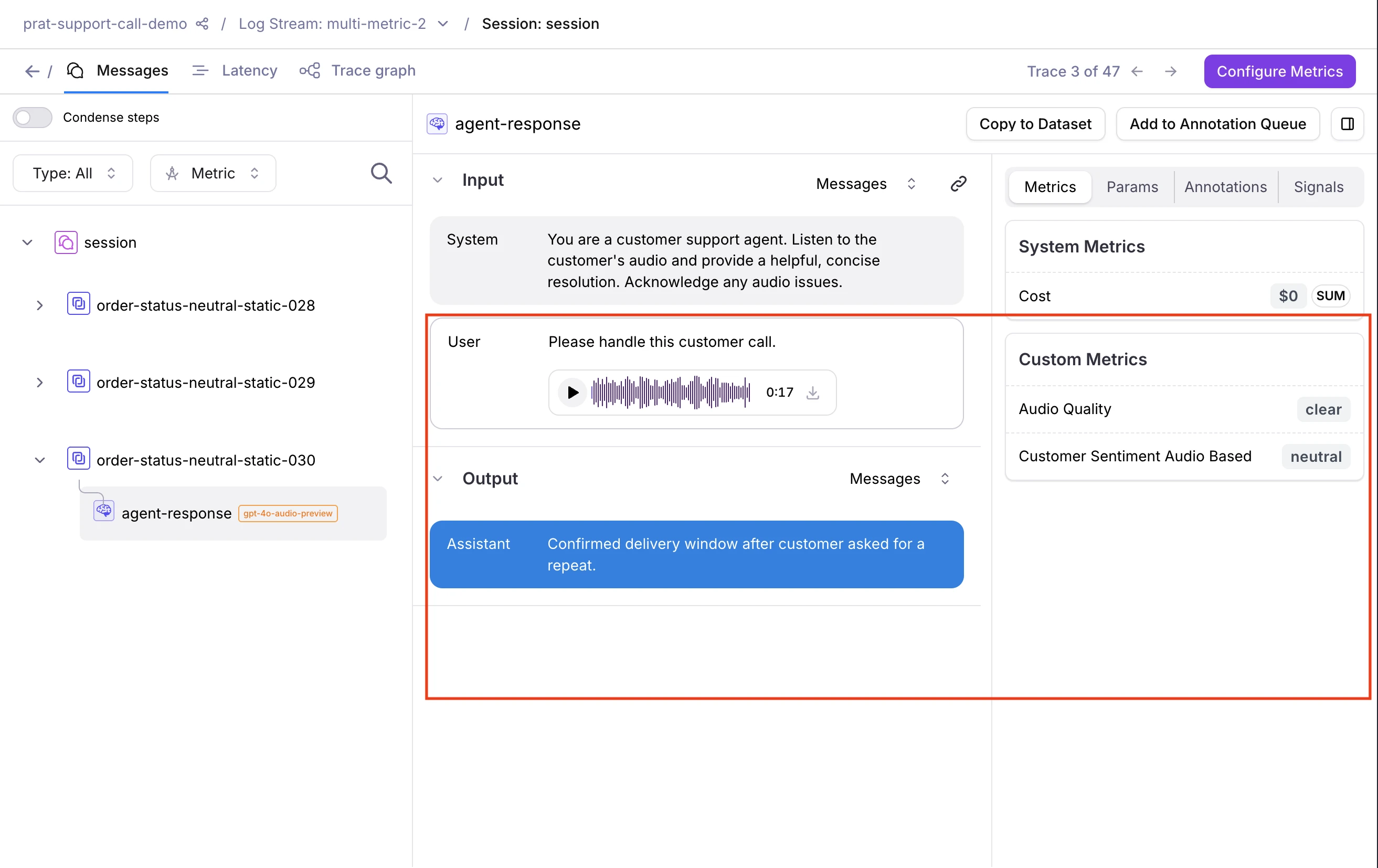 Multimodal content renders inline in the Log stream alongside span inputs and outputs:
* **Audio** renders as an inline waveform player you can play back directly, with download support
* **Images** display inline and can be downloaded
* **PDFs** appear as inline previews and can be downloaded
***
## Evaluate multimodal traces
Galileo provides out-of-the-box LLM-as-a-judge metrics for multimodal content. You can also configure custom LLM-as-a-judge metrics on any span, trace, or session that contains multimodal content.
### Out-of-the-box metrics
| Metric | Modality | What it evaluates |
| :---------------------------------------------------------------------------------------- | :---------- | :----------------------------------------------------------------------------- |
| [**Visual Quality**](/concepts/metrics/multimodal-quality/visual-quality) | Image / PDF | Whether input quality is sufficient for the task to be reliably performed |
| [**Visual Fidelity**](/concepts/metrics/multimodal-quality/visual-fidelity) | Image / PDF | Whether a generated image complies with brand rules, based on visible evidence |
| [**Interruption Detection**](/concepts/metrics/multimodal-quality/interruption-detection) | Audio | Turn-taking violations — agent overlap, premature barge-in, and user barge-in |
### Custom LLM-as-a-judge metrics
Multimodal content renders inline in the Log stream alongside span inputs and outputs:
* **Audio** renders as an inline waveform player you can play back directly, with download support
* **Images** display inline and can be downloaded
* **PDFs** appear as inline previews and can be downloaded
***
## Evaluate multimodal traces
Galileo provides out-of-the-box LLM-as-a-judge metrics for multimodal content. You can also configure custom LLM-as-a-judge metrics on any span, trace, or session that contains multimodal content.
### Out-of-the-box metrics
| Metric | Modality | What it evaluates |
| :---------------------------------------------------------------------------------------- | :---------- | :----------------------------------------------------------------------------- |
| [**Visual Quality**](/concepts/metrics/multimodal-quality/visual-quality) | Image / PDF | Whether input quality is sufficient for the task to be reliably performed |
| [**Visual Fidelity**](/concepts/metrics/multimodal-quality/visual-fidelity) | Image / PDF | Whether a generated image complies with brand rules, based on visible evidence |
| [**Interruption Detection**](/concepts/metrics/multimodal-quality/interruption-detection) | Audio | Turn-taking violations — agent overlap, premature barge-in, and user barge-in |
### Custom LLM-as-a-judge metrics
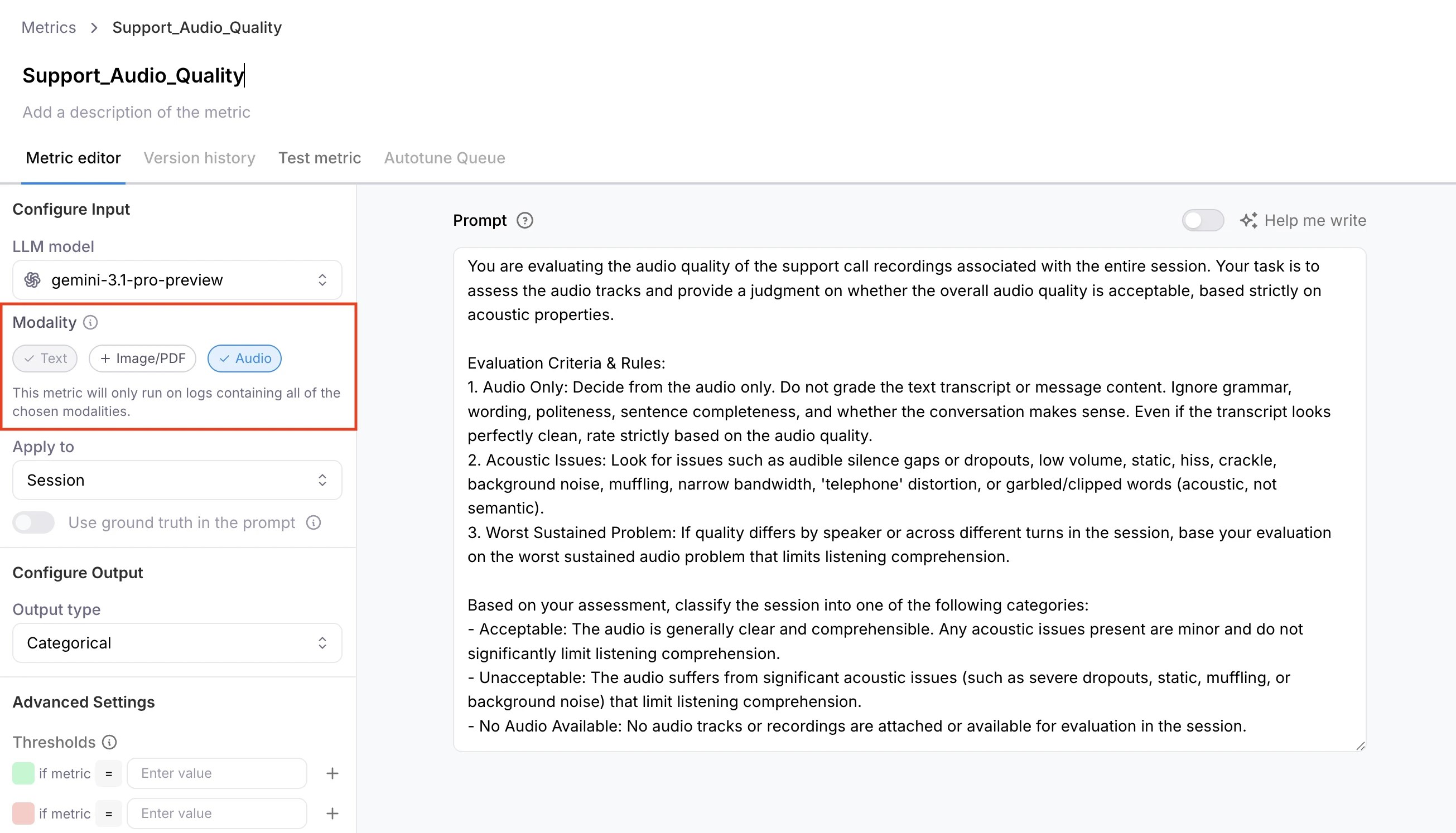 1. Go to **Metrics** and create a new custom LLM metric.
2. Configure a model integration. See [suggested models](#suggested-models) below.
3. Under capabilities, select **Image/PDF** or **Audio**.
4. Enable the metric on your Log stream **before** logging content.
Metrics compute only when the trace contains at least one attachment matching the enabled capability. A metric with **Image/PDF** enabled returns N/A if the trace contains only audio, or no attachments at all. Similarly, a metric with
**Audio** enabled returns N/A on image-only traces.
***
## Supported formats and models
### Supported formats
| Modality | Formats |
| :------- | :------------ |
| Image | `png`, `jpeg` |
| Audio | `mp3`, `wav` |
| Document | `pdf` |
### Suggested models
For best results, use gpt-5 or later (OpenAI) for image and PDF evaluation, and Gemini 3+ via Vertex AI for audio. If using Vertex AI, you will also need to configure a separate GCP bucket and credentials for file uploads. See [how to set up a Vertex AI integration](https://v2galileo.mintlify.app/api-reference/integrations/create-or-update-vertex-ai-integration#create-or-update-vertex-ai-integration).
***
## Known limitations
* **LangChain handler stores the full message list.** The trace's input and output fields contain the full serialized message structure (e.g., `[{"content": [...blocks...], "role": "user"}]`), not bare content blocks.
* **Multimodal attachments are not supported via OpenTelemetry or native callbacks** (e.g., Google ADK, CrewAI). Use GalileoLogger or the LangChain/LangGraph callback instead.
* **Multimodal metrics are not supported in playground or prompt experiments.**
***
## Next steps
Full reference for logging with GalileoLogger.
Complete guide to the Galileo LangChain integration.
1. Go to **Metrics** and create a new custom LLM metric.
2. Configure a model integration. See [suggested models](#suggested-models) below.
3. Under capabilities, select **Image/PDF** or **Audio**.
4. Enable the metric on your Log stream **before** logging content.
Metrics compute only when the trace contains at least one attachment matching the enabled capability. A metric with **Image/PDF** enabled returns N/A if the trace contains only audio, or no attachments at all. Similarly, a metric with
**Audio** enabled returns N/A on image-only traces.
***
## Supported formats and models
### Supported formats
| Modality | Formats |
| :------- | :------------ |
| Image | `png`, `jpeg` |
| Audio | `mp3`, `wav` |
| Document | `pdf` |
### Suggested models
For best results, use gpt-5 or later (OpenAI) for image and PDF evaluation, and Gemini 3+ via Vertex AI for audio. If using Vertex AI, you will also need to configure a separate GCP bucket and credentials for file uploads. See [how to set up a Vertex AI integration](https://v2galileo.mintlify.app/api-reference/integrations/create-or-update-vertex-ai-integration#create-or-update-vertex-ai-integration).
***
## Known limitations
* **LangChain handler stores the full message list.** The trace's input and output fields contain the full serialized message structure (e.g., `[{"content": [...blocks...], "role": "user"}]`), not bare content blocks.
* **Multimodal attachments are not supported via OpenTelemetry or native callbacks** (e.g., Google ADK, CrewAI). Use GalileoLogger or the LangChain/LangGraph callback instead.
* **Multimodal metrics are not supported in playground or prompt experiments.**
***
## Next steps
Full reference for logging with GalileoLogger.
Complete guide to the Galileo LangChain integration.