> ## Documentation Index
> Fetch the complete documentation index at: https://docs.galileo.ai/llms.txt
> Use this file to discover all available pages before exploring further.
# Datasets overview
> Manage test sets and training sets across all your projects.
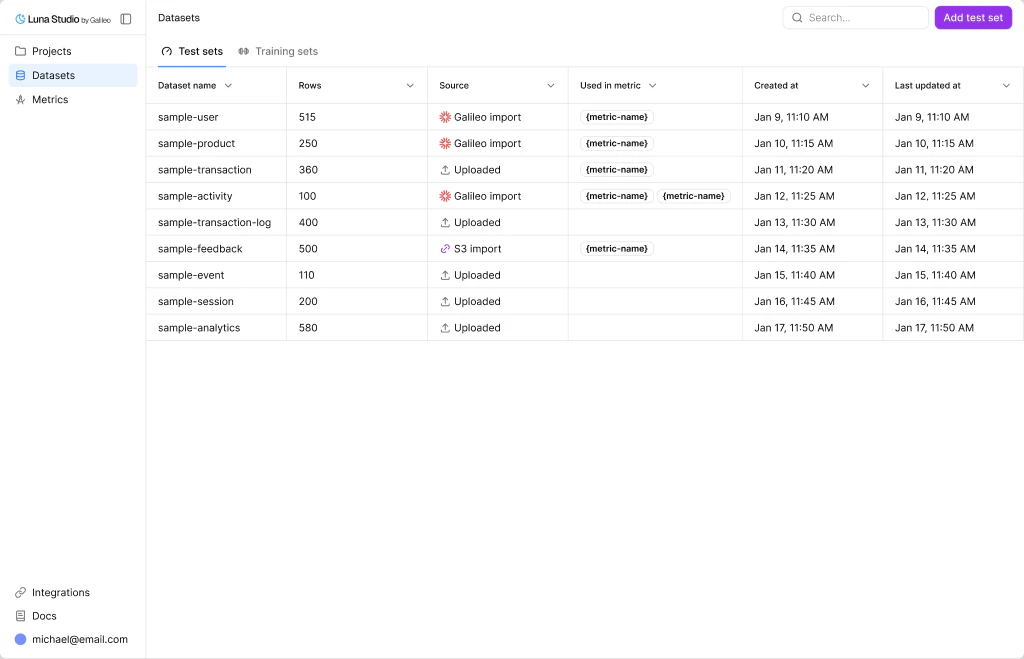
The **Datasets** page (sidebar → **Datasets**) is where you manage every dataset in your org. Datasets are **org-scoped** — once added, they're available across every project for any training run.
 ## Test sets vs. training sets
Luna Studio splits datasets into two flavors, accessible via tabs on the page:
Small, hand-labelled datasets used to evaluate fine-tuned metrics. Required for every run.
Larger datasets used to fine-tune the base model. Often generated from a test set.
The active tab determines what shows in the table and which **Add** button is shown.
## Datasets table
Both tabs use the same column layout:
| Column | What it shows |
| --------------- | ------------------------------------------------------------------------------------- |
| Dataset name | The dataset's name. |
| Rows | Row count, with thousands separators. |
| Source | One of **Galileo** (Galileo glyph), **Upload** (upload icon), or **URL** (link icon). |
| Used in metric | Outline-style badges for each metric that uses this dataset. Empty if unused. |
| Created at | When the dataset was added. |
| Last updated at | When the dataset was most recently changed. |
Click any row to view the dataset.
## Top-bar actions
* **Search** — filter by dataset name.
* **Add test set / Add training set** — primary button. The label tracks the active tab. Opens the **Add dataset** modal — see [Add a dataset](/luna-studio/ui/datasets/add-a-dataset).
## How datasets relate to runs
Each [training run](/luna-studio/ui/runs/lifecycle) consumes exactly one test set and one training set. The same dataset can be reused across many runs.
```mermaid theme={null}
flowchart LR
TestSet1["Test set: rag-eval-v2"] --> Run1["Run 1: generated training set"]
TestSet1 --> Run2["Run 2: uploaded training logs"]
TrainSet1["Training set: generated from rag-eval-v2"] --> Run1
TrainSet2["Training set: imported production logs"] --> Run2
```
The **Used in metric** column on the datasets table shows you which metrics' fine-tuning depends on a dataset — useful before deleting one.
## Source types
| Source | What it means |
| ------- | --------------------------------------------------------------------------- |
| Upload | You uploaded a `.csv` or `.jsonl` file from your machine. |
| URL | Luna fetched the dataset from an http/https/s3/gs URL. |
| Galileo | Luna pulled the dataset from a project in your connected Galileo workspace. |
For training sets specifically, an additional source applies:
* **Generated** — produced by the [Generate from test set](/luna-studio/ui/runs/new-run/step-3-training-set#generate-from-test-set) flow inside the run creation flow.
## Where to go next
What test sets are, schema rules, and best practices.
What training sets are and how to create or reuse them.
Reference for the three dataset sources (Upload, URL, Galileo).
What Luna checks when you add a dataset.
## Test sets vs. training sets
Luna Studio splits datasets into two flavors, accessible via tabs on the page:
Small, hand-labelled datasets used to evaluate fine-tuned metrics. Required for every run.
Larger datasets used to fine-tune the base model. Often generated from a test set.
The active tab determines what shows in the table and which **Add** button is shown.
## Datasets table
Both tabs use the same column layout:
| Column | What it shows |
| --------------- | ------------------------------------------------------------------------------------- |
| Dataset name | The dataset's name. |
| Rows | Row count, with thousands separators. |
| Source | One of **Galileo** (Galileo glyph), **Upload** (upload icon), or **URL** (link icon). |
| Used in metric | Outline-style badges for each metric that uses this dataset. Empty if unused. |
| Created at | When the dataset was added. |
| Last updated at | When the dataset was most recently changed. |
Click any row to view the dataset.
## Top-bar actions
* **Search** — filter by dataset name.
* **Add test set / Add training set** — primary button. The label tracks the active tab. Opens the **Add dataset** modal — see [Add a dataset](/luna-studio/ui/datasets/add-a-dataset).
## How datasets relate to runs
Each [training run](/luna-studio/ui/runs/lifecycle) consumes exactly one test set and one training set. The same dataset can be reused across many runs.
```mermaid theme={null}
flowchart LR
TestSet1["Test set: rag-eval-v2"] --> Run1["Run 1: generated training set"]
TestSet1 --> Run2["Run 2: uploaded training logs"]
TrainSet1["Training set: generated from rag-eval-v2"] --> Run1
TrainSet2["Training set: imported production logs"] --> Run2
```
The **Used in metric** column on the datasets table shows you which metrics' fine-tuning depends on a dataset — useful before deleting one.
## Source types
| Source | What it means |
| ------- | --------------------------------------------------------------------------- |
| Upload | You uploaded a `.csv` or `.jsonl` file from your machine. |
| URL | Luna fetched the dataset from an http/https/s3/gs URL. |
| Galileo | Luna pulled the dataset from a project in your connected Galileo workspace. |
For training sets specifically, an additional source applies:
* **Generated** — produced by the [Generate from test set](/luna-studio/ui/runs/new-run/step-3-training-set#generate-from-test-set) flow inside the run creation flow.
## Where to go next
What test sets are, schema rules, and best practices.
What training sets are and how to create or reuse them.
Reference for the three dataset sources (Upload, URL, Galileo).
What Luna checks when you add a dataset.