> ## Documentation Index
> Fetch the complete documentation index at: https://docs.galileo.ai/llms.txt
> Use this file to discover all available pages before exploring further.
# Galileo integration
> The single API key that unlocks Galileo platform features in Luna Studio.
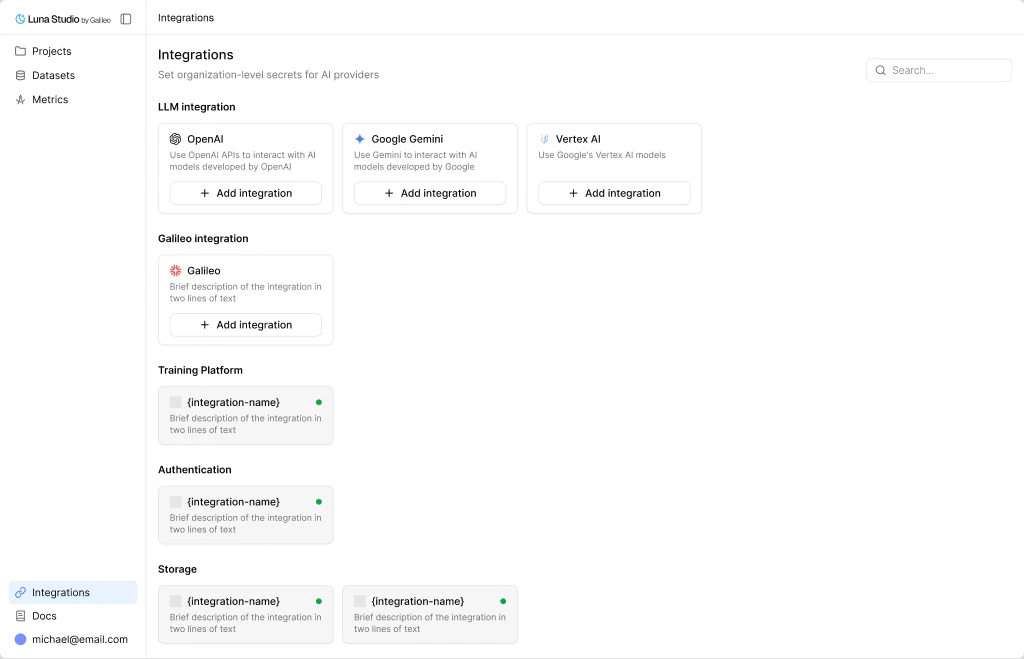
The Galileo integration connects Luna Studio to the rest of the Galileo platform with a single API key.
 ## When you need it
The Galileo integration unlocks two platform features:
* **Import from Galileo** — pull datasets from your Galileo workspace into Luna Studio. Available when [adding a dataset](/luna-studio/ui/datasets/add-a-dataset) and in [Step 2](/luna-studio/ui/runs/new-run/step-2-test-set) and [Step 3](/luna-studio/ui/runs/new-run/step-3-training-set) of the run creation flow.
* **Register metric** — publish a fine-tuned metric from Luna Studio into the Galileo metrics store, where it becomes available across evaluation, observability, and guardrails. See [Register a metric](/luna-studio/ui/runs/register-metric).
You can use Luna Studio without the Galileo integration — uploads, URL fetches, and local-only flows work fine — but registration and Galileo-sourced data require it.
## Add the integration
From the sidebar footer, click **Integrations**.
Get your key from the Galileo console.
After saving, Galileo-backed features are available to your org.
## Update or remove
* **Update** — replace the API key if it changes.
* **Remove** — disables Import from Galileo and Register metric for future use across the org.
Removing the Galileo integration **does not unregister** any metrics already published to the Galileo metrics store. Those metrics remain live until you remove them from the Galileo platform itself.
## Where to go next
* Import a dataset → [Add a dataset](/luna-studio/ui/datasets/add-a-dataset).
* Register a fine-tuned metric → [Register a metric](/luna-studio/ui/runs/register-metric).
* Other integrations → [Integrations overview](/luna-studio/ui/integrations/overview).
## When you need it
The Galileo integration unlocks two platform features:
* **Import from Galileo** — pull datasets from your Galileo workspace into Luna Studio. Available when [adding a dataset](/luna-studio/ui/datasets/add-a-dataset) and in [Step 2](/luna-studio/ui/runs/new-run/step-2-test-set) and [Step 3](/luna-studio/ui/runs/new-run/step-3-training-set) of the run creation flow.
* **Register metric** — publish a fine-tuned metric from Luna Studio into the Galileo metrics store, where it becomes available across evaluation, observability, and guardrails. See [Register a metric](/luna-studio/ui/runs/register-metric).
You can use Luna Studio without the Galileo integration — uploads, URL fetches, and local-only flows work fine — but registration and Galileo-sourced data require it.
## Add the integration
From the sidebar footer, click **Integrations**.
Get your key from the Galileo console.
After saving, Galileo-backed features are available to your org.
## Update or remove
* **Update** — replace the API key if it changes.
* **Remove** — disables Import from Galileo and Register metric for future use across the org.
Removing the Galileo integration **does not unregister** any metrics already published to the Galileo metrics store. Those metrics remain live until you remove them from the Galileo platform itself.
## Where to go next
* Import a dataset → [Add a dataset](/luna-studio/ui/datasets/add-a-dataset).
* Register a fine-tuned metric → [Register a metric](/luna-studio/ui/runs/register-metric).
* Other integrations → [Integrations overview](/luna-studio/ui/integrations/overview).