> ## Documentation Index
> Fetch the complete documentation index at: https://docs.galileo.ai/llms.txt
> Use this file to discover all available pages before exploring further.
# Integrations overview
> Connect model providers and Galileo so your whole org can use them in Luna Studio.
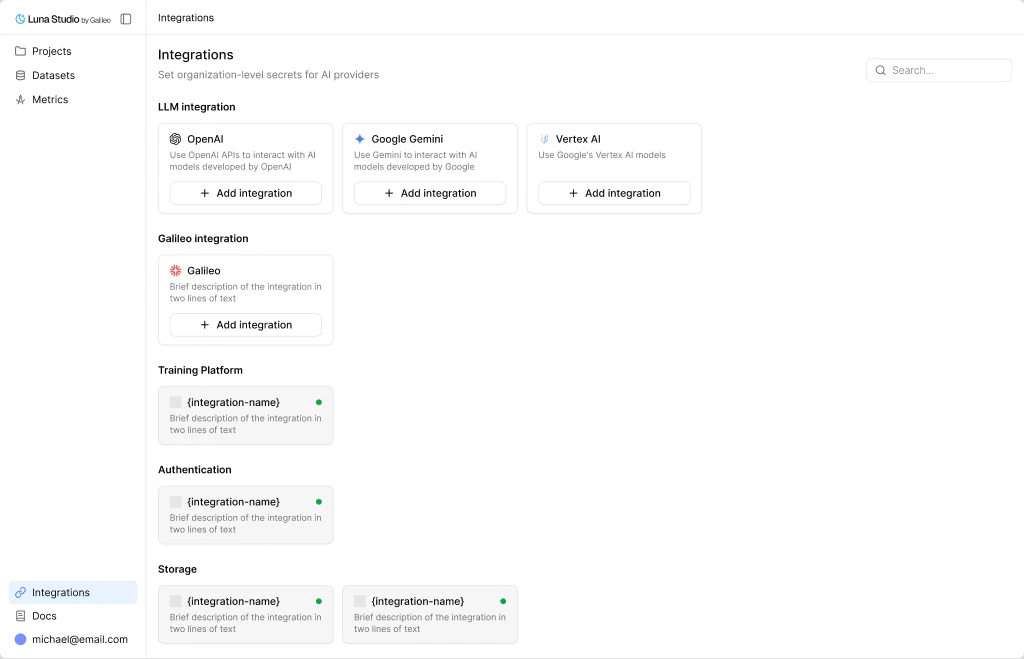
The **Integrations** page is where you connect the external services Luna Studio needs. Integrations are **org-scoped** - once added, every project in your org can use them.
 ## What integrations are for
Luna Studio works with two kinds of integrations:
* **Runtime integrations** - connect the services Luna Studio uses while the app is running, such as LLM providers and Galileo.
* **Deployment integrations** - connect the training platform Luna Studio uses behind the scenes for fine-tuning jobs.
You don't need every provider — most users start with one (OpenAI or Anthropic) and add more later.
## Runtime integration types
### LLM providers
Use an LLM integration when you want Luna Studio to work with a hosted provider, a cloud-managed deployment, or your own internal model endpoint.
Supported setups include:
* named providers such as [OpenAI](/luna-studio/ui/integrations/llm-providers#openai), [Anthropic](/luna-studio/ui/integrations/llm-providers#anthropic), [Mistral](/luna-studio/ui/integrations/llm-providers#mistral), and others
* [Azure](/luna-studio/ui/integrations/llm-providers#azure)
* [Vertex AI](/luna-studio/ui/integrations/llm-providers#vertex-ai)
* [AWS-hosted models](/luna-studio/ui/integrations/llm-providers#aws-hosted-models)
* [Custom models and proxies](/luna-studio/ui/integrations/llm-providers#custom-models-and-proxies)
For setup guidance, see [LLM providers](/luna-studio/ui/integrations/llm-providers).
### Galileo
The [Galileo integration](/luna-studio/ui/integrations/galileo) is a single API key that unlocks platform-level features such as importing datasets from Galileo and registering metrics back to Galileo.
## Training platforms
Luna Studio also supports training platform integrations for the infrastructure that runs fine-tuning jobs:
* `Vertex AI Pipelines`
* `AzureML Pipelines`
* `SageMaker Pipelines`
* `Kubernetes`
These are **deployment-level integrations**, not settings users configure in the Luna Studio UI. The training platform is chosen when Luna Studio is deployed and is fixed for that deployment. See [Availability and deployment](/luna-studio/ui/availability) for how Galileo provisions Luna Studio into your cluster.
## Where to go next
Choose the right provider setup for your team and see what credentials you'll need.
The single API key that unlocks platform features.
## What integrations are for
Luna Studio works with two kinds of integrations:
* **Runtime integrations** - connect the services Luna Studio uses while the app is running, such as LLM providers and Galileo.
* **Deployment integrations** - connect the training platform Luna Studio uses behind the scenes for fine-tuning jobs.
You don't need every provider — most users start with one (OpenAI or Anthropic) and add more later.
## Runtime integration types
### LLM providers
Use an LLM integration when you want Luna Studio to work with a hosted provider, a cloud-managed deployment, or your own internal model endpoint.
Supported setups include:
* named providers such as [OpenAI](/luna-studio/ui/integrations/llm-providers#openai), [Anthropic](/luna-studio/ui/integrations/llm-providers#anthropic), [Mistral](/luna-studio/ui/integrations/llm-providers#mistral), and others
* [Azure](/luna-studio/ui/integrations/llm-providers#azure)
* [Vertex AI](/luna-studio/ui/integrations/llm-providers#vertex-ai)
* [AWS-hosted models](/luna-studio/ui/integrations/llm-providers#aws-hosted-models)
* [Custom models and proxies](/luna-studio/ui/integrations/llm-providers#custom-models-and-proxies)
For setup guidance, see [LLM providers](/luna-studio/ui/integrations/llm-providers).
### Galileo
The [Galileo integration](/luna-studio/ui/integrations/galileo) is a single API key that unlocks platform-level features such as importing datasets from Galileo and registering metrics back to Galileo.
## Training platforms
Luna Studio also supports training platform integrations for the infrastructure that runs fine-tuning jobs:
* `Vertex AI Pipelines`
* `AzureML Pipelines`
* `SageMaker Pipelines`
* `Kubernetes`
These are **deployment-level integrations**, not settings users configure in the Luna Studio UI. The training platform is chosen when Luna Studio is deployed and is fixed for that deployment. See [Availability and deployment](/luna-studio/ui/availability) for how Galileo provisions Luna Studio into your cluster.
## Where to go next
Choose the right provider setup for your team and see what credentials you'll need.
The single API key that unlocks platform features.