> ## Documentation Index
> Fetch the complete documentation index at: https://docs.galileo.ai/llms.txt
> Use this file to discover all available pages before exploring further.
# Training runs home
> The main project workspace: status summary, filters, and the runs table.
The **Training runs** page is the heart of every project. It shows every run you've launched in this project, plus the controls to filter, star, and act on them.
To get here, click any project on the [Projects](/luna-studio/ui/projects/overview) page.
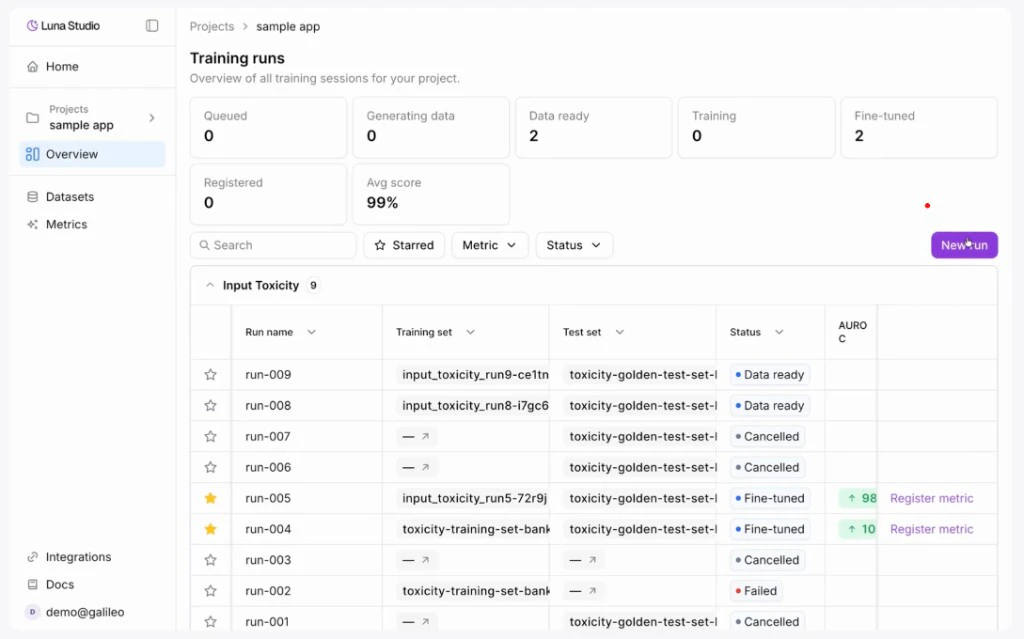 ## Status summary stat cards
Below the page header is a row of stat cards — one per [run lifecycle status](/luna-studio/ui/runs/lifecycle):
| Stat | What it counts |
| ---------- | ------------------------------------------------------- |
| Queued | Runs accepted but not yet started. |
| Training | Runs currently fine-tuning. |
| Fine-tuned | Runs that completed training and are ready to register. |
| Registered | Runs whose metric has been published to Galileo. |
| Failed | Runs whose training or registration failed. |
The numbers update live as runs change status.
## Filter toolbar
Below the stat cards, the filter toolbar lets you narrow the runs table:
| Control | Behavior |
| ------------- | ----------------------------------------------------------------------------------------------- |
| Search | Filter by run name or by metric name. |
| Starred | Toggle to show only starred runs. The icon turns amber when active. |
| Metric | Multi-select dropdown. Options are the unique metrics in this project's runs. |
| Status | Multi-select dropdown of the five lifecycle statuses. |
| Clear filters | Appears once any filter is active. Resets all filters to the default. |
| **New run** | Primary button on the right. Opens [Creating a new run](/luna-studio/ui/runs/new-run/overview). |
The **Starred** filter is the fastest way to surface runs you're actively iterating on. Star a row from the leftmost column of the table — see below.
## Runs table
The runs table has these columns:
| Column | What it shows |
| ------------ | ------------------------------------------------------------------------------------------------------------------------------------------------ |
| Star | Click to star the run. Pinned to the left of the table. |
| Run name | The name you gave the run (or the auto-generated `New Run N`). |
| Metric | Outline-style badge with the metric name. |
| Training set | Interactive chip showing the training set used for the run. |
| Test set | Interactive chip showing the test set used for the run. |
| Status | Status pill. See [Run lifecycle](/luna-studio/ui/runs/lifecycle). |
| F1 score | Coloured pill showing F1 score relative to thresholds. Up arrow ≥ 0.80, down arrow \< 0.30, neutral otherwise. Only shown for runs with a score. |
| Created at | When the run was launched. |
| Actions | For **Fine-tuned** runs only: a **Register metric** link. Pinned to the right. |
## Star a run
Click the star icon in the leftmost column to mark a run as important. Starred runs stay starred until you click the icon again. Combine with the **Starred** filter to focus on the runs you're actively comparing.
## Empty states
The page shows different copy depending on the filter context:
| When | What you see |
| -------------------------------- | ------------------------------------------------------------- |
| No runs yet | "No training runs yet" with a hint to "Start a new run". |
| Active filters return no results | "No runs match your filters" with a **Clear filters** button. |
## Where to go next
Walk through the four-step run creation flow.
The five statuses runs flow through.
Publish a fine-tuned metric to the Galileo metrics store.
## Status summary stat cards
Below the page header is a row of stat cards — one per [run lifecycle status](/luna-studio/ui/runs/lifecycle):
| Stat | What it counts |
| ---------- | ------------------------------------------------------- |
| Queued | Runs accepted but not yet started. |
| Training | Runs currently fine-tuning. |
| Fine-tuned | Runs that completed training and are ready to register. |
| Registered | Runs whose metric has been published to Galileo. |
| Failed | Runs whose training or registration failed. |
The numbers update live as runs change status.
## Filter toolbar
Below the stat cards, the filter toolbar lets you narrow the runs table:
| Control | Behavior |
| ------------- | ----------------------------------------------------------------------------------------------- |
| Search | Filter by run name or by metric name. |
| Starred | Toggle to show only starred runs. The icon turns amber when active. |
| Metric | Multi-select dropdown. Options are the unique metrics in this project's runs. |
| Status | Multi-select dropdown of the five lifecycle statuses. |
| Clear filters | Appears once any filter is active. Resets all filters to the default. |
| **New run** | Primary button on the right. Opens [Creating a new run](/luna-studio/ui/runs/new-run/overview). |
The **Starred** filter is the fastest way to surface runs you're actively iterating on. Star a row from the leftmost column of the table — see below.
## Runs table
The runs table has these columns:
| Column | What it shows |
| ------------ | ------------------------------------------------------------------------------------------------------------------------------------------------ |
| Star | Click to star the run. Pinned to the left of the table. |
| Run name | The name you gave the run (or the auto-generated `New Run N`). |
| Metric | Outline-style badge with the metric name. |
| Training set | Interactive chip showing the training set used for the run. |
| Test set | Interactive chip showing the test set used for the run. |
| Status | Status pill. See [Run lifecycle](/luna-studio/ui/runs/lifecycle). |
| F1 score | Coloured pill showing F1 score relative to thresholds. Up arrow ≥ 0.80, down arrow \< 0.30, neutral otherwise. Only shown for runs with a score. |
| Created at | When the run was launched. |
| Actions | For **Fine-tuned** runs only: a **Register metric** link. Pinned to the right. |
## Star a run
Click the star icon in the leftmost column to mark a run as important. Starred runs stay starred until you click the icon again. Combine with the **Starred** filter to focus on the runs you're actively comparing.
## Empty states
The page shows different copy depending on the filter context:
| When | What you see |
| -------------------------------- | ------------------------------------------------------------- |
| No runs yet | "No training runs yet" with a hint to "Start a new run". |
| Active filters return no results | "No runs match your filters" with a **Clear filters** button. |
## Where to go next
Walk through the four-step run creation flow.
The five statuses runs flow through.
Publish a fine-tuned metric to the Galileo metrics store.