> ## Documentation Index
> Fetch the complete documentation index at: https://docs.galileo.ai/llms.txt
> Use this file to discover all available pages before exploring further.
# Register a metric
> Publish a fine-tuned metric to the Galileo metrics store.
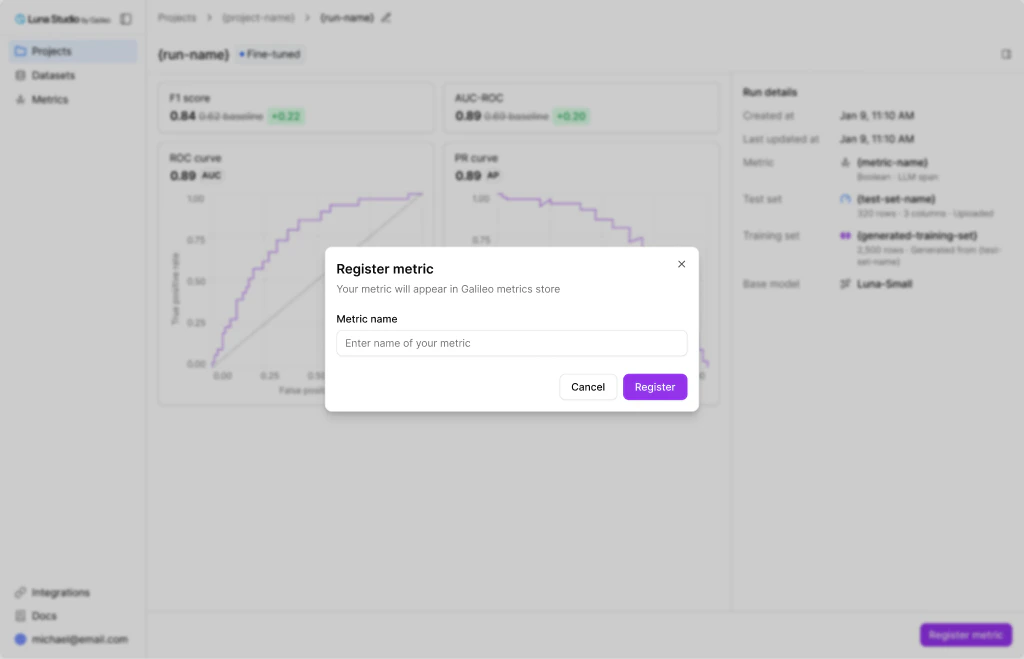
Once a run reaches **Fine-tuned**, you can register the resulting metric. Registration publishes the metric to the [Galileo metrics store](/concepts/metrics/overview), where it becomes available across the Galileo platform — for evaluation in experiments, Log streams, and runtime guardrails using Protect / Agent Control.
 ## Prerequisites
* The run must be in the **Fine-tuned** status. See [Run lifecycle](/luna-studio/ui/runs/lifecycle).
* Your org must have an active [Galileo integration](/luna-studio/ui/integrations/galileo).
## Where you can register from
The **Register metric** action appears in three places:
* **Run details page** — primary footer button on Fine-tuned runs.
* **Training runs table** — an action link on each Fine-tuned row. See [Training runs home](/luna-studio/ui/projects/training-runs-home#runs-table).
* **Metrics page** — an action link on each Fine-tuned metric. See [Metrics overview](/luna-studio/ui/metrics/overview).
All three open the same **Register metric** flow.
## Steps
From the run details footer, the runs table row, or the metrics page row.
Use a name that's clear in the Galileo metrics store, where it'll sit alongside built-in metrics. Examples: `support-tone-strict`, `pii-detector-en`.
The modal closes. The run's status flips to **Registered** and the **Register metric** affordance disappears for that run.
## Naming guidance
* Use lowercase with hyphens: `customer-tone-classifier`, not `Customer Tone Classifier`.
* Include the language or domain if relevant: `pii-detector-en`, `legal-toxicity`.
* Add version suffixes (`-v1`, `-v2`) if you are registering multiple variants.
Metric names should be unique within your Galileo workspace. If a metric with the same name already exists, registration fails with a duplicate-name error. Pick a different name and try again.
## Where to go next
Use registered metrics in runtime protection workflows.
Learn how to call Protect from code with the Galileo SDK.
Understand how Luna-based metrics power evaluation and protection.
## Prerequisites
* The run must be in the **Fine-tuned** status. See [Run lifecycle](/luna-studio/ui/runs/lifecycle).
* Your org must have an active [Galileo integration](/luna-studio/ui/integrations/galileo).
## Where you can register from
The **Register metric** action appears in three places:
* **Run details page** — primary footer button on Fine-tuned runs.
* **Training runs table** — an action link on each Fine-tuned row. See [Training runs home](/luna-studio/ui/projects/training-runs-home#runs-table).
* **Metrics page** — an action link on each Fine-tuned metric. See [Metrics overview](/luna-studio/ui/metrics/overview).
All three open the same **Register metric** flow.
## Steps
From the run details footer, the runs table row, or the metrics page row.
Use a name that's clear in the Galileo metrics store, where it'll sit alongside built-in metrics. Examples: `support-tone-strict`, `pii-detector-en`.
The modal closes. The run's status flips to **Registered** and the **Register metric** affordance disappears for that run.
## Naming guidance
* Use lowercase with hyphens: `customer-tone-classifier`, not `Customer Tone Classifier`.
* Include the language or domain if relevant: `pii-detector-en`, `legal-toxicity`.
* Add version suffixes (`-v1`, `-v2`) if you are registering multiple variants.
Metric names should be unique within your Galileo workspace. If a metric with the same name already exists, registration fails with a duplicate-name error. Pick a different name and try again.
## Where to go next
Use registered metrics in runtime protection workflows.
Learn how to call Protect from code with the Galileo SDK.
Understand how Luna-based metrics power evaluation and protection.