> ## Documentation Index
> Fetch the complete documentation index at: https://docs.galileo.ai/llms.txt
> Use this file to discover all available pages before exploring further.
# Distributed Tracing (Beta)
> Log traces across multiple services
{/**/}
If your application uses a microservices architecture, distributed tracing allows you to trace requests across multiple services.
With distributed tracing enabled, spans created in downstream services (e.g. a retrieval service) get automatically linked to the parent trace in the upstream service (e.g. an orchestrator service).
## Distributed Traces in the Galileo Console
Inputs and outputs from distributed traces are combined into one view in the Console UI.
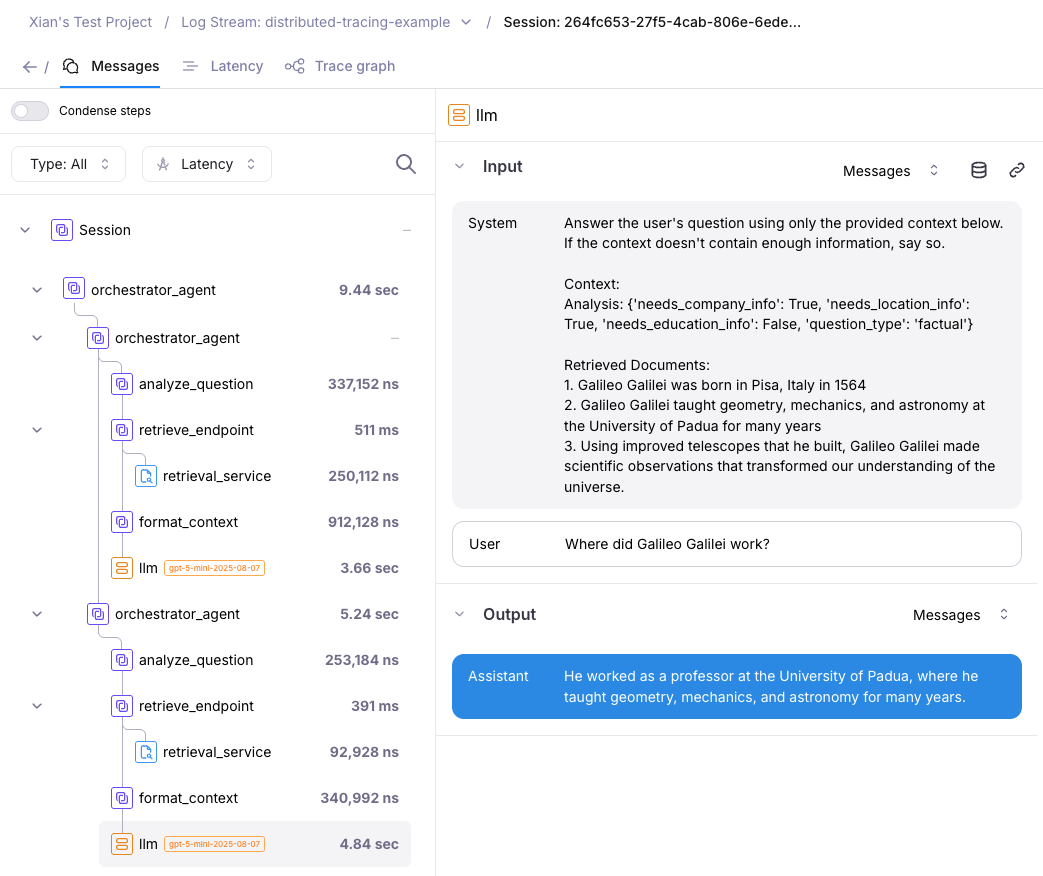 The above screenshot shows a session, traces, and spans coming from 2 services on different processes:
* **Retrieval Service:** A FastAPI service running on port 8000 that handles information retrieval.
* **Orchestrator Service:** The main client that coordinates the RAG pipeline by calling the retrieval service.
## Example: Two-service RAG pipeline
A code example of setting up Distributed Tracing is available in [this Python SDK repository location](https://github.com/rungalileo/sdk-examples/tree/main/python/logging-samples/distributed-tracing).
This code example follows a client-server model where:
1. Client starts a trace
2. Client makes HTTP requests to one or more server(s)
3. Server processes the request and reports back to the client
4. Client concludes the trace
## How to enable Distributed mode
To enable Distributed Tracing, specify the `mode` in your `.env` file:
```ini .env theme={null}
GALILEO_API_KEY="your-galileo-api-key"
OPENAI_API_KEY="your-openai-api-key"
GALILEO_PROJECT="your-galileo-project"
GALILEO_LOG_STREAM="distributed-tracing-example"
GALILEO_MODE=distributed # enables distributed tracing
# Provide the console url below if you are not using app.galileo.ai
# GALILEO_CONSOLE_URL="your-galileo-console-url"
```
Or, you could do this at the start of your code execution:
```python main.py theme={null}
from galileo import galileo_context
# Initialize in distributed mode
galileo_context.init(mode="distributed")
```
## Beta limitations for Distributed Tracing
Distributed tracing does not currently support:
1. **Fire-and-forget patterns**: Where the client starts a span and doesn't wait for the server to complete. The client must await the server's response.
2. **Parallel nested workflows**: Starting multiple child workflows in parallel using `asyncio.gather()` where each child makes its own HTTP requests to servers.
```python example.py theme={null}
@log(span_type="workflow")
async def parent_workflow():
tasks = [child_workflow(i) for i in range(3)]
await asyncio.gather(*tasks) # Each child makes HTTP requests
```
*Note: This limitation will be addressed in a future release for both distributed tracing and default modes.*
3. **Integrations** - Distributed Tracing does not yet support the following integrations: ADK, OTel, LangChain
Galileo's Distributed Tracing feature is being actively improved. We'd love to hear your feedback and suggestions at [support@galileo.ai](mailto:support@galileo.ai).
## Troubleshooting Tips
**Traces not linking across services?**
* Ensure you're passing `get_tracing_headers()` to downstream HTTP requests
* Verify the server has `TracingMiddleware` configured
* Check that both services have distributed mode enabled
**Missing spans in the trace?**
* Confirm that the server is sending responses back to the client (not fire-and-forget)
* Verify that the client awaits the server response before concluding the trace
The above screenshot shows a session, traces, and spans coming from 2 services on different processes:
* **Retrieval Service:** A FastAPI service running on port 8000 that handles information retrieval.
* **Orchestrator Service:** The main client that coordinates the RAG pipeline by calling the retrieval service.
## Example: Two-service RAG pipeline
A code example of setting up Distributed Tracing is available in [this Python SDK repository location](https://github.com/rungalileo/sdk-examples/tree/main/python/logging-samples/distributed-tracing).
This code example follows a client-server model where:
1. Client starts a trace
2. Client makes HTTP requests to one or more server(s)
3. Server processes the request and reports back to the client
4. Client concludes the trace
## How to enable Distributed mode
To enable Distributed Tracing, specify the `mode` in your `.env` file:
```ini .env theme={null}
GALILEO_API_KEY="your-galileo-api-key"
OPENAI_API_KEY="your-openai-api-key"
GALILEO_PROJECT="your-galileo-project"
GALILEO_LOG_STREAM="distributed-tracing-example"
GALILEO_MODE=distributed # enables distributed tracing
# Provide the console url below if you are not using app.galileo.ai
# GALILEO_CONSOLE_URL="your-galileo-console-url"
```
Or, you could do this at the start of your code execution:
```python main.py theme={null}
from galileo import galileo_context
# Initialize in distributed mode
galileo_context.init(mode="distributed")
```
## Beta limitations for Distributed Tracing
Distributed tracing does not currently support:
1. **Fire-and-forget patterns**: Where the client starts a span and doesn't wait for the server to complete. The client must await the server's response.
2. **Parallel nested workflows**: Starting multiple child workflows in parallel using `asyncio.gather()` where each child makes its own HTTP requests to servers.
```python example.py theme={null}
@log(span_type="workflow")
async def parent_workflow():
tasks = [child_workflow(i) for i in range(3)]
await asyncio.gather(*tasks) # Each child makes HTTP requests
```
*Note: This limitation will be addressed in a future release for both distributed tracing and default modes.*
3. **Integrations** - Distributed Tracing does not yet support the following integrations: ADK, OTel, LangChain
Galileo's Distributed Tracing feature is being actively improved. We'd love to hear your feedback and suggestions at [support@galileo.ai](mailto:support@galileo.ai).
## Troubleshooting Tips
**Traces not linking across services?**
* Ensure you're passing `get_tracing_headers()` to downstream HTTP requests
* Verify the server has `TracingMiddleware` configured
* Check that both services have distributed mode enabled
**Missing spans in the trace?**
* Confirm that the server is sending responses back to the client (not fire-and-forget)
* Verify that the client awaits the server response before concluding the trace