> ## Documentation Index
> Fetch the complete documentation index at: https://docs.galileo.ai/llms.txt
> Use this file to discover all available pages before exploring further.
# OpenAI SDK
> Learn about the Galileo OpenAI integration
{/**/}
The OpenAI wrapper is the simplest way to integrate Galileo logging into your application. By using Galileo's OpenAI wrapper instead of importing the OpenAI library directly, you can automatically log all prompts, responses, and statistics without any additional code changes in an LLM span for every call.
The Python SDK supports both the Chat Completions API and the Responses API. The TypeScript SDK currently only supports the Chat Completions API.
The wrapper supports both the OpenAI and Azure OpenAI APIs, so will work out of the box with Azure deployments, as well as any LLM that supports the OpenAI SDK.
The Python Galileo OpenAI SDK reference.
The TypeScript Galileo OpenAI SDK reference.
## Installation
First, make sure you have the Galileo SDK installed. If you are using Python, ensure you install the OpenAI optional dependency.
```bash Pip theme={null}
pip install "galileo[openai]"
```
```bash uv theme={null}
uv pip install "galileo[openai]"
```
```bash Poetry theme={null}
poetry add "galileo[openai]"
```
```bash npm theme={null}
npm install galileo
```
```bash Yarn theme={null}
yarn add galileo
```
```bash pnpm theme={null}
pnpm add galileo
```
## Basic usage
If you are using Python, import the `galileo.openai` module, instead of the OpenAI `openai` module and use that to create your client. If you are using TypeScript, use the wrapper to wrap your OpenAI client.
```python Python theme={null}
import os
from galileo.openai import openai
# Initialize the Galileo wrapped OpenAI client
client = openai.OpenAI(api_key=os.environ.get("OPENAI_API_KEY"))
# Use the Galileo wrapped OpenAI client which logs automatically
# This will create a single span trace with the OpenAI call
chat_completion = client.chat.completions.create(
messages=[{"role": "user", "content": "Say this is a test"}],
model="gpt-4o"
)
print(chat_completion.choices[0].message.content)
```
```typescript TypeScript theme={null}
import { OpenAI } from "openai";
import { wrapOpenAI, flush } from "galileo";
// Wrap the OpenAI client
const openai = wrapOpenAI(new OpenAI({ apiKey: process.env.OPENAI_API_KEY }));
// Use the Galileo wrapped OpenAI client which logs automatically
// This will create a single span trace with the OpenAI call
const response = await openai.chat.completions.create({
model: "gpt-4.1-mini",
messages: [{ content: "Say hello world!", role: "user" }],
});
// Flush logs before exiting
await flush();
console.log(response);
```
This example will automatically produce a single-span trace in your Log stream. The wrapper handles all the logging for you, capturing:
* The input prompt
* The model used
* The response
* Timing information
* Token usage
* Other relevant metadata
## Responses API (Python only)
The Python SDK also supports OpenAI's [Responses API](https://platform.openai.com/docs/api-reference/responses), which provides a simplified interface for single-turn interactions and additional features like built-in tools.
### Responses API basic example
```python Python theme={null}
from galileo.openai import openai
client = openai.OpenAI()
response = client.responses.create(
model="gpt-4o",
input="What is the capital of France?"
)
print(response.output_text)
```
### Tool calls
The Responses API supports function calling. Here's an example that demonstrates tool definitions, executing tool calls, and providing results back to the model:
```python Python theme={null}
import json
from galileo.openai import openai
client = openai.OpenAI()
# Define tools
tools = [
{
"type": "function",
"name": "get_weather",
"description": "Get the current weather for a given location",
"parameters": {
"type": "object",
"properties": {
"location": {
"type": "string",
"description": "The city and state, e.g. San Francisco, CA",
},
},
"required": ["location"],
},
},
{
"type": "function",
"name": "get_stock_price",
"description": "Get the current stock price for a given ticker symbol",
"parameters": {
"type": "object",
"properties": {
"symbol": {
"type": "string",
"description": "The stock ticker symbol, e.g. AAPL",
},
},
"required": ["symbol"],
},
},
]
def get_weather(location: str) -> str:
return json.dumps({"location": location, "temperature": 72, "unit": "fahrenheit"})
def get_stock_price(symbol: str) -> str:
return json.dumps({"symbol": symbol.upper(), "price": 178.50, "currency": "USD"})
# First call - model decides which tools to use
user_message = "What's the weather in San Francisco and the stock price of Apple?"
response = client.responses.create(
model="gpt-4o",
input=user_message,
tools=tools,
)
# Process tool calls and collect results
input_list = list(response.output)
for item in response.output:
if item.type == "function_call":
if item.name == "get_weather":
result = get_weather(**json.loads(item.arguments))
elif item.name == "get_stock_price":
result = get_stock_price(**json.loads(item.arguments))
else:
continue
input_list.append({
"type": "function_call_output",
"call_id": item.call_id,
"output": result,
})
# Second call - model generates final response with tool results
response = client.responses.create(
model="gpt-4o",
input=input_list,
tools=tools,
)
print(response.output_text)
```
The Responses API also supports advanced features like:
* **Reasoning items** with the `reasoning` parameter for chain-of-thought outputs
* **Built-in tools** including web search, code interpreter, and file search
* **Streaming** with `stream=True`
See the [OpenAI Responses API documentation](https://platform.openai.com/docs/api-reference/responses) for more details.
## Sessions and traces
If you use the OpenAI wrapper by itself, it will automatically create a session and start a new trace for you, adding the call as an LLM span. Subsequent calls will be added as an LLM span to a new trace in the same session. The session will have an autogenerated name based off the content.
```python Python theme={null}
import os
from galileo.openai import openai
# Initialize the Galileo wrapped OpenAI client
client = openai.OpenAI(api_key=os.environ.get("OPENAI_API_KEY"))
# Use the Galileo wrapped OpenAI client which logs automatically
# This will create a single span trace with the OpenAI call in a new session
first_result = client.chat.completions.create(
messages=[{"role": "user", "content": "Tell me about the Roman Empire"}],
model="gpt-4o"
)
# This second call will create a new single span trace inside the same session
second_result = client.chat.completions.create(
messages=[{
"role": "user",
"content": f"Summarize this: {first_result.choices[0].message.content}"
}],
model="gpt-4o"
)
print(second_result.choices[0].message.content)
```
```typescript TypeScript theme={null}
import { OpenAI } from "openai";
import { wrapOpenAI, flush } from "galileo";
// Wrap the OpenAI client
const openai = wrapOpenAI(new OpenAI({ apiKey: process.env.OPENAI_API_KEY }));
// Use the Galileo wrapped OpenAI client which logs automatically
// This will create a single span trace with the OpenAI call in a new session
const firstResult = await openai.chat.completions.create({
messages: [{"role": "user", "content": "Tell me about the Roman Empire"}],
model: "gpt-4.1-mini"
});
// This second call will create a new single span trace inside the same session
const secondResult = await openai.chat.completions.create({
messages: [{
"role": "user",
"content": `Summarize this: ${firstResult.choices[0].message.content}`
}],
model: "gpt-4.1-mini"
});
console.log(secondResult.choices[0].message.content);
// Flush logs before exiting
await flush();
```
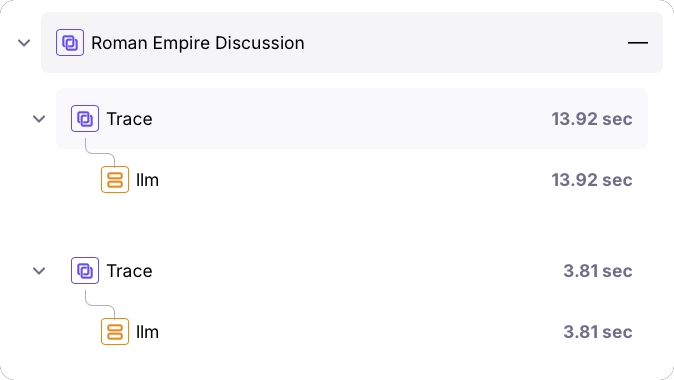 If you manually start a session before using the OpenAI wrapper, all calls to the wrapper will be added as new traces to that session.
```python Python theme={null}
import os
from galileo.openai import openai
from galileo import galileo_context
# Get the logger instance
logger = galileo_context.get_logger_instance()
# Start a session
logger.start_session("Chat about the Roman Empire")
# Initialize the Galileo wrapped OpenAI client
client = openai.OpenAI(api_key=os.environ.get("OPENAI_API_KEY"))
# Use the Galileo wrapped OpenAI client which logs automatically
# This will create a single span trace in the current session
first_result = client.chat.completions.create(
messages=[{"role": "user", "content": "Tell me about the Roman Empire"}],
model="gpt-4o"
)
# This second call will create a new single span trace inside the same session
second_result = client.chat.completions.create(
messages=[{
"role": "user",
"content": f"Summarize this: {first_result.choices[0].message.content}"
}],
model="gpt-4o"
)
print(second_result.choices[0].message.content)
```
```typescript TypeScript theme={null}
import { OpenAI } from "openai";
import { wrapOpenAI, flush, getLogger } from "galileo";
// Get the logger instance
const logger = getLogger();
// Start a session
logger.startSession({
name: "Chat about the Roman Empire",
});
// Wrap the OpenAI client
const openai = wrapOpenAI(new OpenAI({ apiKey: process.env.OPENAI_API_KEY }));
// Use the Galileo wrapped OpenAI client which logs automatically
// This will create a single span trace in the current session
const firstResult = await openai.chat.completions.create({
messages: [{"role": "user", "content": "Tell me about the Roman Empire"}],
model: "gpt-4.1-mini"
});
// This second call will create a new single span trace inside the same session
const secondResult = await openai.chat.completions.create({
messages: [{
"role": "user",
"content": `Summarize this: ${firstResult.choices[0].message.content}`
}],
model: "gpt-4.1-mini"
});
console.log(secondResult.choices[0].message.content);
// Flush logs before exiting
await flush();
```
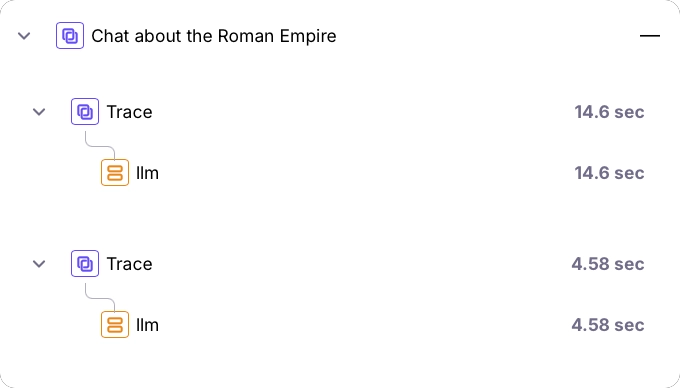
If you manually start a session before using the OpenAI wrapper, all calls to the wrapper will be added as new traces to that session.
```python Python theme={null}
import os
from galileo.openai import openai
from galileo import galileo_context
# Get the logger instance
logger = galileo_context.get_logger_instance()
# Start a session
logger.start_session("Chat about the Roman Empire")
# Initialize the Galileo wrapped OpenAI client
client = openai.OpenAI(api_key=os.environ.get("OPENAI_API_KEY"))
# Use the Galileo wrapped OpenAI client which logs automatically
# This will create a single span trace in the current session
first_result = client.chat.completions.create(
messages=[{"role": "user", "content": "Tell me about the Roman Empire"}],
model="gpt-4o"
)
# This second call will create a new single span trace inside the same session
second_result = client.chat.completions.create(
messages=[{
"role": "user",
"content": f"Summarize this: {first_result.choices[0].message.content}"
}],
model="gpt-4o"
)
print(second_result.choices[0].message.content)
```
```typescript TypeScript theme={null}
import { OpenAI } from "openai";
import { wrapOpenAI, flush, getLogger } from "galileo";
// Get the logger instance
const logger = getLogger();
// Start a session
logger.startSession({
name: "Chat about the Roman Empire",
});
// Wrap the OpenAI client
const openai = wrapOpenAI(new OpenAI({ apiKey: process.env.OPENAI_API_KEY }));
// Use the Galileo wrapped OpenAI client which logs automatically
// This will create a single span trace in the current session
const firstResult = await openai.chat.completions.create({
messages: [{"role": "user", "content": "Tell me about the Roman Empire"}],
model: "gpt-4.1-mini"
});
// This second call will create a new single span trace inside the same session
const secondResult = await openai.chat.completions.create({
messages: [{
"role": "user",
"content": `Summarize this: ${firstResult.choices[0].message.content}`
}],
model: "gpt-4.1-mini"
});
console.log(secondResult.choices[0].message.content);
// Flush logs before exiting
await flush();
```
 If you create a new trace before using the OpenAI wrapper, all calls will be added as LLM spans to that trace.
```python Python theme={null}
import os
from galileo.openai import openai
from galileo import galileo_context
# Get the logger instance
logger = galileo_context.get_logger_instance()
# Start a session
logger.start_session("Chat about the Roman Empire")
# Start a new trace
logger.start_trace("Summary of the Roman Empire")
# Initialize the Galileo wrapped OpenAI client
client = openai.OpenAI(api_key=os.environ.get("OPENAI_API_KEY"))
# Use the Galileo wrapped OpenAI client which logs automatically
# This will create a single span trace in the current session
first_result = client.chat.completions.create(
messages=[{"role": "user", "content": "Tell me about the Roman Empire"}],
model="gpt-4o"
)
# This second call will create a new single span trace inside the same session
second_result = client.chat.completions.create(
messages=[{
"role": "user",
"content": f"Summarize this: {first_result.choices[0].message.content}"
}],
model="gpt-4o"
)
print(second_result.choices[0].message.content)
```
```typescript TypeScript theme={null}
import { OpenAI } from "openai";
import { wrapOpenAI, flush, getLogger } from "galileo";
// Get the logger instance
const logger = getLogger();
// Start a session
logger.startSession({
name: "Chat about the Roman Empire",
});
// Start a new trace
const trace = logger.startTrace({
input: "Summary of the Roman Empire"
});
// Wrap the OpenAI client
const openai = wrapOpenAI(new OpenAI({ apiKey: process.env.OPENAI_API_KEY }));
// Use the Galileo wrapped OpenAI client which logs automatically
// This will create a single span trace in the current session
const firstResult = await openai.chat.completions.create({
messages: [{"role": "user", "content": "Tell me about the Roman Empire"}],
model: "gpt-4.1-mini"
});
// This second call will create a new single span trace inside the same session
const secondResult = await openai.chat.completions.create({
messages: [{
"role": "user",
"content": `Summarize this: ${firstResult.choices[0].message.content}`
}],
model: "gpt-4.1-mini"
});
console.log(secondResult.choices[0].message.content);
// Flush logs before exiting
await flush();
```
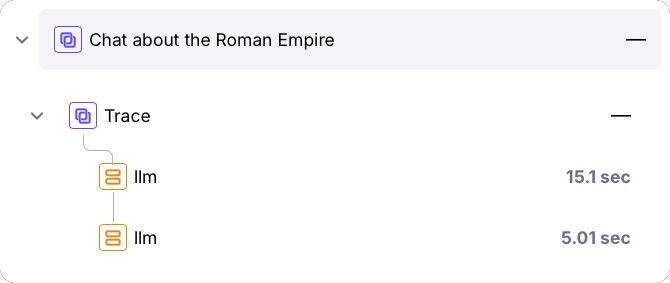
If you create a new trace before using the OpenAI wrapper, all calls will be added as LLM spans to that trace.
```python Python theme={null}
import os
from galileo.openai import openai
from galileo import galileo_context
# Get the logger instance
logger = galileo_context.get_logger_instance()
# Start a session
logger.start_session("Chat about the Roman Empire")
# Start a new trace
logger.start_trace("Summary of the Roman Empire")
# Initialize the Galileo wrapped OpenAI client
client = openai.OpenAI(api_key=os.environ.get("OPENAI_API_KEY"))
# Use the Galileo wrapped OpenAI client which logs automatically
# This will create a single span trace in the current session
first_result = client.chat.completions.create(
messages=[{"role": "user", "content": "Tell me about the Roman Empire"}],
model="gpt-4o"
)
# This second call will create a new single span trace inside the same session
second_result = client.chat.completions.create(
messages=[{
"role": "user",
"content": f"Summarize this: {first_result.choices[0].message.content}"
}],
model="gpt-4o"
)
print(second_result.choices[0].message.content)
```
```typescript TypeScript theme={null}
import { OpenAI } from "openai";
import { wrapOpenAI, flush, getLogger } from "galileo";
// Get the logger instance
const logger = getLogger();
// Start a session
logger.startSession({
name: "Chat about the Roman Empire",
});
// Start a new trace
const trace = logger.startTrace({
input: "Summary of the Roman Empire"
});
// Wrap the OpenAI client
const openai = wrapOpenAI(new OpenAI({ apiKey: process.env.OPENAI_API_KEY }));
// Use the Galileo wrapped OpenAI client which logs automatically
// This will create a single span trace in the current session
const firstResult = await openai.chat.completions.create({
messages: [{"role": "user", "content": "Tell me about the Roman Empire"}],
model: "gpt-4.1-mini"
});
// This second call will create a new single span trace inside the same session
const secondResult = await openai.chat.completions.create({
messages: [{
"role": "user",
"content": `Summarize this: ${firstResult.choices[0].message.content}`
}],
model: "gpt-4.1-mini"
});
console.log(secondResult.choices[0].message.content);
// Flush logs before exiting
await flush();
```
 ## Streaming support
The OpenAI wrapper also supports streaming responses. When streaming, the wrapper will log the response as it streams in:
```python Python theme={null}
import os
from galileo.openai import openai
client = openai.OpenAI(api_key=os.environ.get("OPENAI_API_KEY"))
stream = client.chat.completions.create(
messages=[{"role": "user", "content": "Say this is a streaming test"}],
model="gpt-4o",
stream=True,
)
# This will create a single span trace with the OpenAI call
for chunk in stream:
print(chunk.choices[0].delta.content or "", end="")
```
```typescript TypeScript theme={null}
import { OpenAI } from "openai";
import { wrapOpenAI, flush } from "galileo";
const openai = wrapOpenAI(new OpenAI({ apiKey: process.env.OPENAI_API_KEY }));
const stream = await openai.chat.completions.create({
messages: [{"role": "user", "content": "Say this is a streaming test"}],
model: "gpt-4.1-mini",
stream: true
});
for await (const part of stream) {
console.log(part.choices[0]?.delta?.content || '');
}
// Flush logs before exiting
await flush();
```
## Combining with the log decorator
You can combine the OpenAI wrapper with the `log` decorator to create more complex traces:
```python Python theme={null}
import os
from galileo import log
from galileo.openai import openai
client = openai.OpenAI(api_key=os.environ.get("OPENAI_API_KEY"))
def call_openai(prompt):
# This will be automatically logged as a child span
chat_completion = client.chat.completions.create(
messages=[{"role": "user", "content": prompt}],
model="gpt-4o"
)
return chat_completion.choices[0].message.content
@log(span_type="workflow", name="Roman Empire Span")
def make_nested_call():
# This creates a parent workflow span
first_result = call_openai("Tell me about the Roman Empire")
second_result = call_openai(f"Summarize this: {first_result}")
return second_result
# This will create a trace with a workflow span and two nested LLM spans
response = make_nested_call()
print(response)
```
```typescript TypeScript theme={null}
import { log, flush, wrapOpenAI } from "galileo";
import { OpenAI } from "openai";
// Create a wrapped OpenAI client
const openai = wrapOpenAI(new OpenAI({ apiKey: process.env.OPENAI_API_KEY }));
async function callOpenAI(prompt: string) {
// This will be automatically logged as a child span
const response = await openai.chat.completions.create({
model: "gpt-4.1-mini",
messages: [{ role: "user", content: prompt }],
});
return response.choices[0].message.content;
}
const makeNestedCall = log({ spanType: "workflow", name: "Roman Empire Span" },
async () => {
// This creates a parent workflow span
const firstResult = await callOpenAI("Tell me about the Roman Empire")
const secondResult = await callOpenAI(`Summarize this: ${firstResult}`)
return secondResult
});
const response = await makeNestedCall();
await flush();
console.log(response);
```
## Benefits of using the OpenAI integration
* **Zero-config logging**: No need to add logging code throughout your application
* **Complete visibility**: All prompts and responses are automatically captured
* **Minimal code changes**: Change your import statement in Python, or create a wrapper in TypeScript. No other code changes are required.
* **Automatic tracing**: Creates spans and traces without manual setup
* **Streaming support**: Works with both regular and streaming responses
### Asynchronous OpenAI calls with Galileo
The Galileo OpenAI wrapper currently supports only synchronous calls for both the Chat Completions API and the Responses API. It does not include built-in support for the `AsyncOpenAI` class from the official OpenAI Python library. As a result, asynchronous calls made via the `galileo.openai` wrapper won't automatically generate LLM spans or upload telemetry to Galileo.
You can still track async interactions by manually using the low-level `GalileoLogger` API. This requires importing and awaiting the OpenAI `AsyncOpenAI` client, wrapping each call with [a call to add an LLM span](/sdk-api/logging/galileo-logger#llm-spans), and flushing the logger to send your traces.
## Next steps
Log with full control over sessions, traces, and spans using the Galileo logger.
Quickly add logging to your code with the log decorator and wrapper.
Manage logging using the Galileo context manager.
## Streaming support
The OpenAI wrapper also supports streaming responses. When streaming, the wrapper will log the response as it streams in:
```python Python theme={null}
import os
from galileo.openai import openai
client = openai.OpenAI(api_key=os.environ.get("OPENAI_API_KEY"))
stream = client.chat.completions.create(
messages=[{"role": "user", "content": "Say this is a streaming test"}],
model="gpt-4o",
stream=True,
)
# This will create a single span trace with the OpenAI call
for chunk in stream:
print(chunk.choices[0].delta.content or "", end="")
```
```typescript TypeScript theme={null}
import { OpenAI } from "openai";
import { wrapOpenAI, flush } from "galileo";
const openai = wrapOpenAI(new OpenAI({ apiKey: process.env.OPENAI_API_KEY }));
const stream = await openai.chat.completions.create({
messages: [{"role": "user", "content": "Say this is a streaming test"}],
model: "gpt-4.1-mini",
stream: true
});
for await (const part of stream) {
console.log(part.choices[0]?.delta?.content || '');
}
// Flush logs before exiting
await flush();
```
## Combining with the log decorator
You can combine the OpenAI wrapper with the `log` decorator to create more complex traces:
```python Python theme={null}
import os
from galileo import log
from galileo.openai import openai
client = openai.OpenAI(api_key=os.environ.get("OPENAI_API_KEY"))
def call_openai(prompt):
# This will be automatically logged as a child span
chat_completion = client.chat.completions.create(
messages=[{"role": "user", "content": prompt}],
model="gpt-4o"
)
return chat_completion.choices[0].message.content
@log(span_type="workflow", name="Roman Empire Span")
def make_nested_call():
# This creates a parent workflow span
first_result = call_openai("Tell me about the Roman Empire")
second_result = call_openai(f"Summarize this: {first_result}")
return second_result
# This will create a trace with a workflow span and two nested LLM spans
response = make_nested_call()
print(response)
```
```typescript TypeScript theme={null}
import { log, flush, wrapOpenAI } from "galileo";
import { OpenAI } from "openai";
// Create a wrapped OpenAI client
const openai = wrapOpenAI(new OpenAI({ apiKey: process.env.OPENAI_API_KEY }));
async function callOpenAI(prompt: string) {
// This will be automatically logged as a child span
const response = await openai.chat.completions.create({
model: "gpt-4.1-mini",
messages: [{ role: "user", content: prompt }],
});
return response.choices[0].message.content;
}
const makeNestedCall = log({ spanType: "workflow", name: "Roman Empire Span" },
async () => {
// This creates a parent workflow span
const firstResult = await callOpenAI("Tell me about the Roman Empire")
const secondResult = await callOpenAI(`Summarize this: ${firstResult}`)
return secondResult
});
const response = await makeNestedCall();
await flush();
console.log(response);
```
## Benefits of using the OpenAI integration
* **Zero-config logging**: No need to add logging code throughout your application
* **Complete visibility**: All prompts and responses are automatically captured
* **Minimal code changes**: Change your import statement in Python, or create a wrapper in TypeScript. No other code changes are required.
* **Automatic tracing**: Creates spans and traces without manual setup
* **Streaming support**: Works with both regular and streaming responses
### Asynchronous OpenAI calls with Galileo
The Galileo OpenAI wrapper currently supports only synchronous calls for both the Chat Completions API and the Responses API. It does not include built-in support for the `AsyncOpenAI` class from the official OpenAI Python library. As a result, asynchronous calls made via the `galileo.openai` wrapper won't automatically generate LLM spans or upload telemetry to Galileo.
You can still track async interactions by manually using the low-level `GalileoLogger` API. This requires importing and awaiting the OpenAI `AsyncOpenAI` client, wrapping each call with [a call to add an LLM span](/sdk-api/logging/galileo-logger#llm-spans), and flushing the logger to send your traces.
## Next steps
Log with full control over sessions, traces, and spans using the Galileo logger.
Quickly add logging to your code with the log decorator and wrapper.
Manage logging using the Galileo context manager.