

Distributed Traces in the Galileo Console
Inputs and outputs from distributed traces are combined into one view in the Console UI.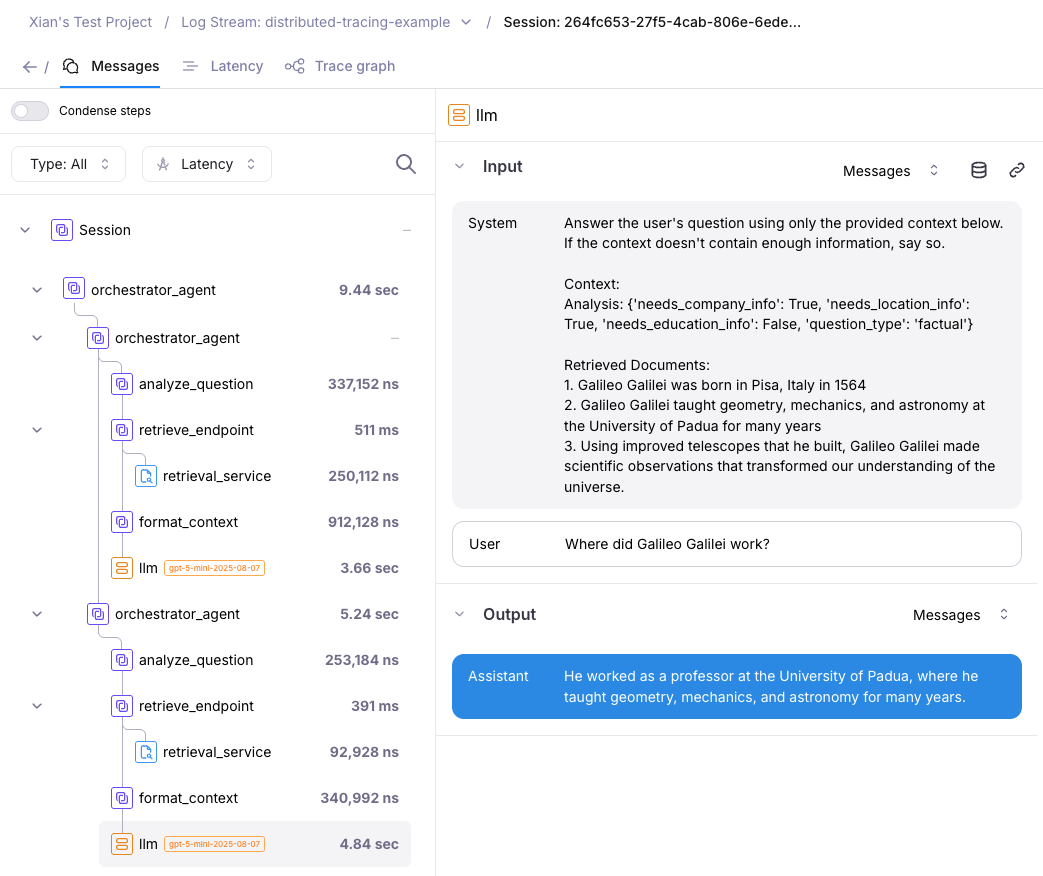
- Retrieval Service: A FastAPI service running on port 8000 that handles information retrieval.
- Orchestrator Service: The main client that coordinates the RAG pipeline by calling the retrieval service.
Example: Two-service RAG pipeline
A code example of setting up Distributed Tracing is available in this Python SDK repository location. This code example follows a client-server model where:- Client starts a trace
- Client makes HTTP requests to one or more server(s)
- Server processes the request and reports back to the client
- Client concludes the trace
How to enable Distributed mode
To enable Distributed Tracing, specify themode in your .env file:
Beta limitations for Distributed Tracing
Distributed tracing does not currently support:- Fire-and-forget patterns: Where the client starts a span and doesn’t wait for the server to complete. The client must await the server’s response.
-
Parallel nested workflows: Starting multiple child workflows in parallel using
asyncio.gather()where each child makes its own HTTP requests to servers.Note: This limitation will be addressed in a future release for both distributed tracing and default modes. - Integrations - Distributed Tracing does not yet support the following integrations: ADK, OTel, LangChain
Troubleshooting Tips
Traces not linking across services?- Ensure you’re passing
get_tracing_headers()to downstream HTTP requests - Verify the server has
TracingMiddlewareconfigured - Check that both services have distributed mode enabled
- Confirm that the server is sending responses back to the client (not fire-and-forget)
- Verify that the client awaits the server response before concluding the trace