

@log decorator (Python) or log function wrapper (TypeScript) provides a single line of code way to capture the inputs and outputs of a function as a span within a trace. This is particularly useful for tracking the execution of your AI application without having to manually create and manage spans.
Overview
When you wrap or decorate a function, Galileo automatically:- Starts a session if there isn’t currently a session active
- Starts a trace
- Captures the function’s input arguments
- Tracks the function’s execution
- Records the function’s return value
- Creates an appropriate span in the current trace
- (Python only) Flushes all traces when exiting the decorated function
- You are using LLMs or frameworks that don’t have a Galileo wrapper
- You want to add logging to existing code with minimal code changes
- You need to pass additional details to the logger based on function or method parameters
Python SDK reference
The full SDK reference for the
@log Python decorator.TypeScript SDK reference
The full SDK reference for the
log TypeScript wrapper.Basic usage
To use the@log decorator or log wrapper, import it from the Galileo package and apply it to your functions, setting the span type to be created, and optionally a name.
params parameter.
Span types
By default, the@log decorator creates a workflow span, but you can specify different span types depending on what your function does.
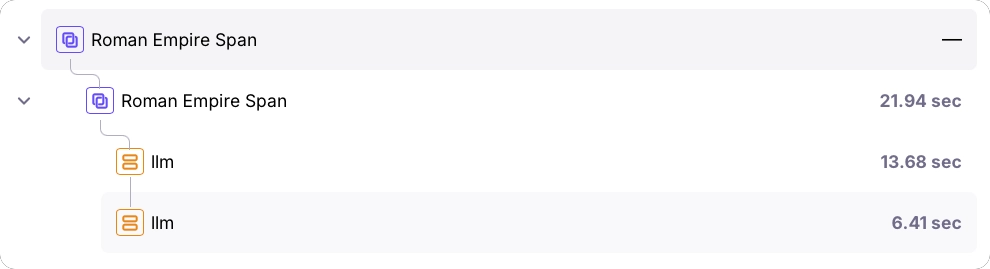
Nested spans example
One of the most powerful features of thelog decorator is its ability to create nested spans, which helps visualize the flow of your application.
You can nest calls to functions also decorated with the log decorator, or calls using third-party SDK integrations.
Additional parameters
When you manually create a span, you can set properties such as tags, metadata, or the model for an LLM span. To do the same for the log decorator, you can map parameters that are passed to the function being logged to these fields in the span. To do this, set the mapping in theparams parameter, with the key being the span property, and the value being the name of the function parameter.
params parameter to add or overwrite the span’s fields’ values. These are the supported parameter names:
Here is an example on how to add metadata and tags to an LLM span:
Context management (Python)
In Python, you can use thegalileo_context to set the project and Log stream for all decorated functions within its scope:
Handling generators (Python)
The@log decorator also works with generator functions, both synchronous and asynchronous:
Best practices
- Decorate high-level functions: For the clearest traces, decorate the highest-level functions that encompass meaningful units of work.
- Use appropriate span types: Choose the span type that best represents what your function does.
- Combine with third-party integrations: The
@logdecorator works seamlessly with Galileo’s third-party integrations, allowing you to create rich, nested traces. - Add meaningful tags: Use the
paramsparameter to add metadata that will make it easier to filter and analyze your traces later. - Be mindful of performance: While the decorator adds minimal overhead, be cautious about decorating very frequently called or performance-critical functions.
Basic logging components
Galileo logger
Log with full control over sessions, traces, and spans using the Galileo logger.
Galileo context
Manage logging using the Galileo context manager.
Integrations with third-party SDKs
OpenAI wrapper
Automatically log calls to the OpenAI SDK with a wrapper.
OpenAI Agents trace processor
Automatically log all the steps in your OpenAI Agent SDK apps using the Galileo trace processor.
LangChain callback
Automatically log all the steps in your LangChain or LangGraph application with the Galileo callback.