Use this file to discover all available pages before exploring further.
The Galileo LangChain integration allows you to automatically log all LangChain and LangGraph interactions with LLMs, including prompts, responses, and performance metrics. The Galileo SDK has a custom callback that is passed to LangChain or LangGraph.
GalileoCallback - Python
The Python Galileo Synchronous LangChain SDK reference.
GalileoAsyncCallback - Python
The Python Galileo Asynchronous LangChain SDK reference.
The integration is based on the GalileoCallback class, which implements LangChain’s callback interface. To use it, create an instance of the callback and pass it to your LangChain components:
from galileo.handlers.langchain import GalileoCallbackfrom langchain_openai import ChatOpenAIfrom langchain_core.messages import HumanMessage# Create a callback handlercallback = GalileoCallback()# Initialize the LLM with the callbackllm = ChatOpenAI(model="gpt-4o", temperature=0.7, callbacks=[callback])# Create a message with the user's querymessages = [ HumanMessage(content="What is LangChain and how is it used with OpenAI?")]# Make the API callresponse = llm.invoke(messages)print(response.content)
The GalileoCallback captures various LangChain events, including:
LLM starts and completions
Chat model interactions
Chain executions
Tool calls
Retriever operations
Agent actions
For each of these events, the callback logs relevant information to Galileo, such as:
Input prompts and messages
Output responses
Model information
Timing data
Token usage
Error information (if any)
The GalileoCallback automatically handles nested chains and agents, creating a hierarchical trace that reflects the structure of your LangChain application.
In Python, there are separate callbacks for synchronous and asynchronous code. If you are using the asynchronous LangChain or LangGraph API, use the GalileoAsyncCallback callback handler.
In TypeScript, the standard GalileoCallback handles async natively — no separate class is needed.
import asynciofrom galileo.handlers.langchain import GalileoAsyncCallbackfrom langchain_openai import ChatOpenAIfrom langchain_core.messages import HumanMessage# Create a callback handlercallback = GalileoAsyncCallback()# Initialize the LLM with the callbackllm = ChatOpenAI(model="gpt-4o", temperature=0.7, callbacks=[callback])# Create a message with the user's querymessages = [ HumanMessage(content="What is LangChain and how is it used with OpenAI?")]async def main(): # Make the API call response = await llm.ainvoke(messages) print(response.content)asyncio.run(main())
When initializing the GalileoCallback, you can optionally specify a Galileo logger instance, either by creating a new logger, or by using the current logger from the Galileo context:
from galileo import GalileoLoggerfrom galileo.handlers.langchain import GalileoCallback# Create a custom loggerlogger = GalileoLogger(project="my-project", log_stream="my-log-stream")# Create a callback with the custom loggercallback = GalileoCallback( galileo_logger=logger, # Optional custom logger start_new_trace=True, # Whether to start a new trace for each chain flush_on_chain_end=True # Whether to flush traces when chains end)
Every time you invoke a chain or an LLM call, a new session and trace is created. If you want to manually manage sessions or traces, you can do this using by passing a Galileo logger instance to the callback.To add the chain or LLM call invocation as a new trace to an existing session, create the session first using the logger instance that was used to create the callback:
from galileo import GalileoLoggerfrom galileo.handlers.langchain import GalileoCallback# Create a custom loggerlogger = GalileoLogger(project="my-project", log_stream="my-log-stream")# Create a callback with the custom loggercallback = GalileoCallback( galileo_logger=logger)# Create a new sessionlogger.start_session(name="My new session")
To add the chain or LLM call invocation to an existing trace, ensure the trace is started, and set the start_new_trace parameter to False (Python) or false (TypeScript).
from galileo import GalileoLoggerfrom galileo.handlers.langchain import GalileoCallback# Create a custom loggerlogger = GalileoLogger(project="my-project", log_stream="my-log-stream")# Create a callback with the custom loggercallback = GalileoCallback( galileo_logger=logger, start_new_trace=False)# Create a new sessionlogger.start_session(name="My new session")# Add a trace and a spanlogger.start_trace("My trace")logger.add_workflow_span("Crew workflow")
You can also use the callback with LangChain chains. Make sure to pass the callback to both the LLM and the chain.
from galileo.handlers.langchain import GalileoAsyncCallbackfrom langchain_openai import ChatOpenAIfrom langchain_core.output_parsers import StrOutputParserfrom langchain_core.prompts import ChatPromptTemplatefrom langchain_core.runnables.config import RunnableConfig# Create a callback handlercallback = GalileoAsyncCallback()# Create the modelllm = ChatOpenAI(model="gpt-4o", temperature=0.7, callbacks=[callback])# Create a prompt templateprompt = ChatPromptTemplate.from_template("Tell me a joke about {topic}")# Assemble the chain with the prompt, LLM, and output parserchain = prompt | llm | StrOutputParser()# Create a configuration for the runnable# that includes the callback handlerconfig = RunnableConfig( callbacks=[callback])# Invoke the chain with a topic and configurationresponse = chain.invoke({"topic": "the Roman Empire"}, config=config)print(response)
You can add custom metadata and tags to your logs by including them in the metadata and tags parameters of a LangChain runnable configuration when invoking a chain or LLM.
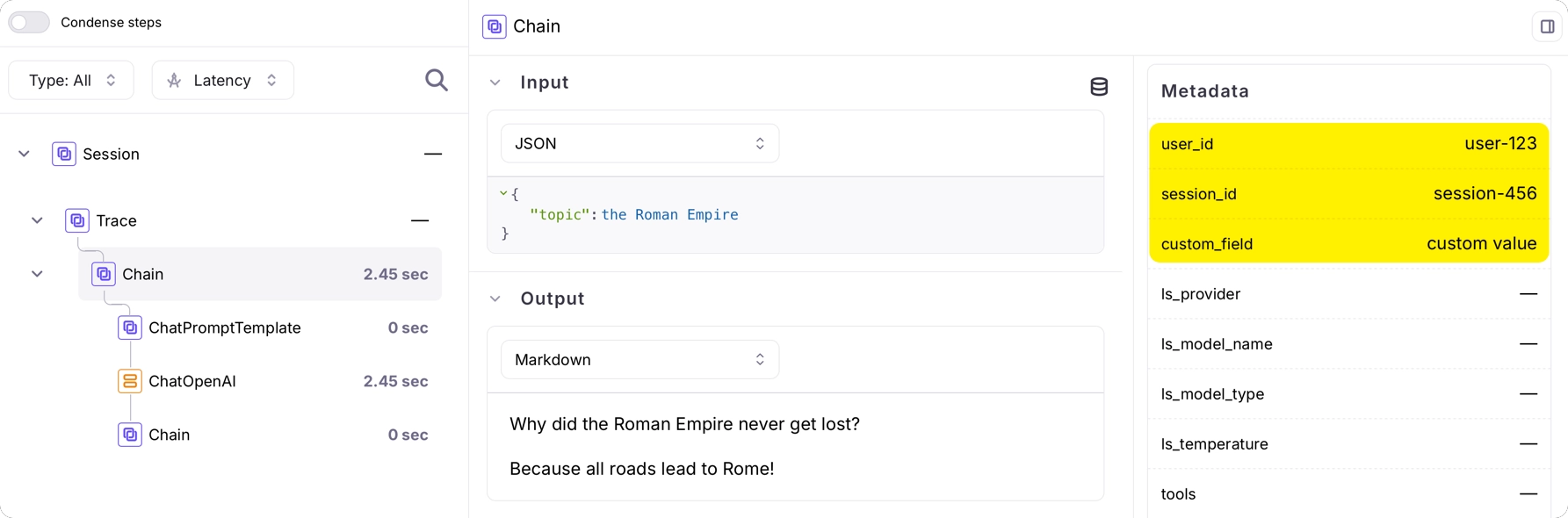
# Create a configuration for the runnable# that includes the callback handler and metadataconfig = RunnableConfig( callbacks=[callback], metadata={ "user_id": "user-123", "session_id": "session-456", "custom_field": "custom value", }, tags=["my-tag"],)# Invoke the chain with a topic and configurationresponse = chain.invoke({"topic": "the Roman Empire"}, config=config)
This metadata will be attached to the logs in Galileo, making it easier to filter and analyze your data.