

A project is the top-level container in Luna Studio. It groups training runs that share a goal — typically improving a single GenAI application or use case within a given domain. The Projects page is the home of the app atDocumentation Index
Fetch the complete documentation index at: https://docs.galileo.ai/llms.txt
Use this file to discover all available pages before exploring further.
/{org} (and the Luna Studio logo always returns you here).
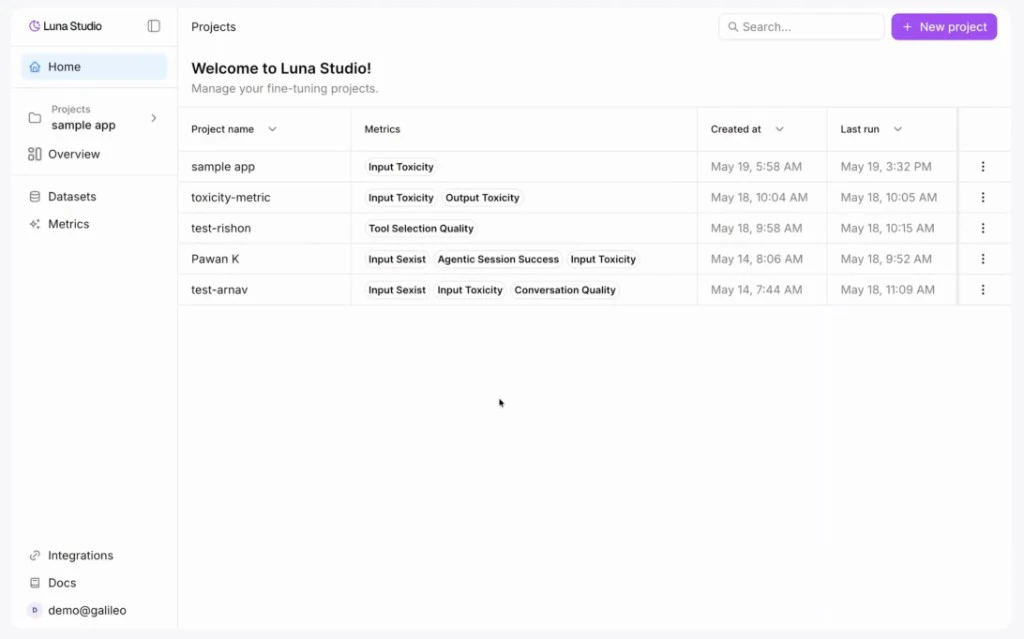
Projects table
The projects table shows every project in your org, with these columns:| Column | What it shows |
|---|---|
| Project name | The name you gave the project. |
| Metrics | Outline-style chips listing the metrics produced by this project’s training runs. |
| Created at | When the project was first created. |
| Last run | When the most recent run was launched. |
| Actions | A … menu with Delete project. |
Top-bar actions
- Search — the input on the right of the page header filters projects by name.
- New project — primary button on the right. Opens the create project modal.
Naming projects
There’s no strict format, but a few patterns work well:- GenAI use case —
customer-support-copilot,enterprise-search-assistant. - Team or domain + use case —
sales-engineering-assistant,hr-policy-assistant. - Versioned —
customer-support-copilot-v2,enterprise-search-assistant-v3for iterating on the same use case.
Delete a project
Open the… action menu on a project row and click Delete project. The action is destructive — Luna Studio will prompt you to confirm before deleting.
How projects relate to other concepts
- Integrations and datasets are org-scoped — they’re shared across every project.
- Runs and metrics are project-scoped — they live inside one project.
Where to go next
Training runs home
The main project workspace: stats, filters, and the runs table.
Creating a new run
The four-step flow for launching a training run.