


 The Luna Studio UI is Galileo’s web app for building real-time custom evaluation metrics tuned to your AI agent. You bring a human-labelled test set; Luna Studio generates a training set from it, fine-tunes a Luna metric on the result, and lets you register eligible metrics in the Galileo metrics store for use in evaluation, observability, and guardrails.
If you’ve ever wanted a metric that understands your definition of “tone consistent”, “grounded answer”, or “policy-violating output” — without writing a custom evaluator from scratch — Luna Studio is built for that.
The Luna Studio UI is Galileo’s web app for building real-time custom evaluation metrics tuned to your AI agent. You bring a human-labelled test set; Luna Studio generates a training set from it, fine-tunes a Luna metric on the result, and lets you register eligible metrics in the Galileo metrics store for use in evaluation, observability, and guardrails.
If you’ve ever wanted a metric that understands your definition of “tone consistent”, “grounded answer”, or “policy-violating output” — without writing a custom evaluator from scratch — Luna Studio is built for that.
Enterprise tier and your own deployment. Luna Studio is part of the enterprise tier of Galileo and is deployed by Galileo into your own cluster or cloud. See Availability and deployment, or contact
us to get started.
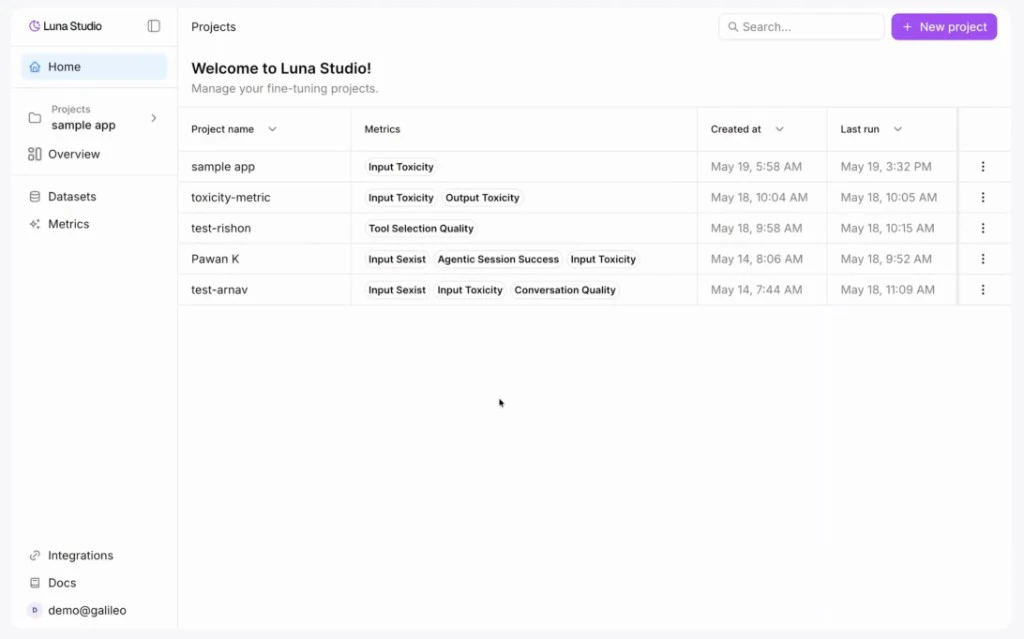
The Projects page — your home base in Luna Studio
What you can do
Fine-tune a custom Luna metric
Pick a metric template, supply a test set, generate a training set, and launch a training run — all in a guided flow.
Create synthetic data
Upload a representative CSV test set, fetch a CSV over HTTP(S), or import one from Galileo. In the run wizard, test sets require at least 300 rows total and 100 per class; Luna Studio targets 2,000 synthetic labelled examples and can append enhancement rows to the final training split.
Track training runs
Filter, star, and compare runs across the complete data-generation, training, registration, failure, and cancellation lifecycle.
Register custom metrics
Once an eligible Luna metric is ready, register it so it shows up across the Galileo platform.
Who Luna Studio is for
- ML and AI engineers who need evaluation metrics tailored to a specific domain (legal, healthcare, RAG over internal docs, multilingual support, etc.).
- Applied scientists who want to skip the boilerplate of fine-tuning evaluator models.
- Platform teams standardizing how their org evaluates LLM applications across many products.
Start here
Availability and deployment
How Luna Studio is provisioned for your org, and what’s fixed at deployment time.
Quickstart
The fastest path from sign up to a registered metric.
Core concepts
Projects, runs, metrics, test sets, training sets, and how they fit together.
Where to go next
- New to evaluation metrics? Read Core concepts.
- Already have a Galileo account? Jump to the Quickstart.
- Wondering which platforms we support? See Integrations overview.
- Stuck? Check the FAQ and Troubleshooting.