Documentation Index
Fetch the complete documentation index at: https://docs.galileo.ai/llms.txt
Use this file to discover all available pages before exploring further.
Use this page to decide which LLM integration fits your setup, then connect it so your org can use those models across Luna Studio.
When you need an LLM integration
Add an LLM integration when you want to:
- Generate the training data for a run from a test set.
- Label the training data with a LLM-as-judge prompt.
Choose the right integration
| If you use… | Choose… |
|---|
| OpenAI, Anthropic, Mistral, Writer, or another named hosted provider | One of the named providers |
| Azure-hosted OpenAI deployments | Azure |
| Google Vertex AI | Vertex AI |
| Models hosted through AWS Bedrock or SageMaker | AWS-hosted models |
| An internal proxy, self-hosted model, or unsupported provider | Custom models and proxies |
Add an integration
Choose the provider you want to use
Pick the provider that matches where your team’s models live today.
Enter the required credentials
Most providers need an API key. Some enterprise or self-hosted setups also need a URL, region, or service-account credentials.
Save the integration
Once saved, the integration becomes available to your whole org.
Named providers
Choose one of these when Luna Studio already supports your provider directly.
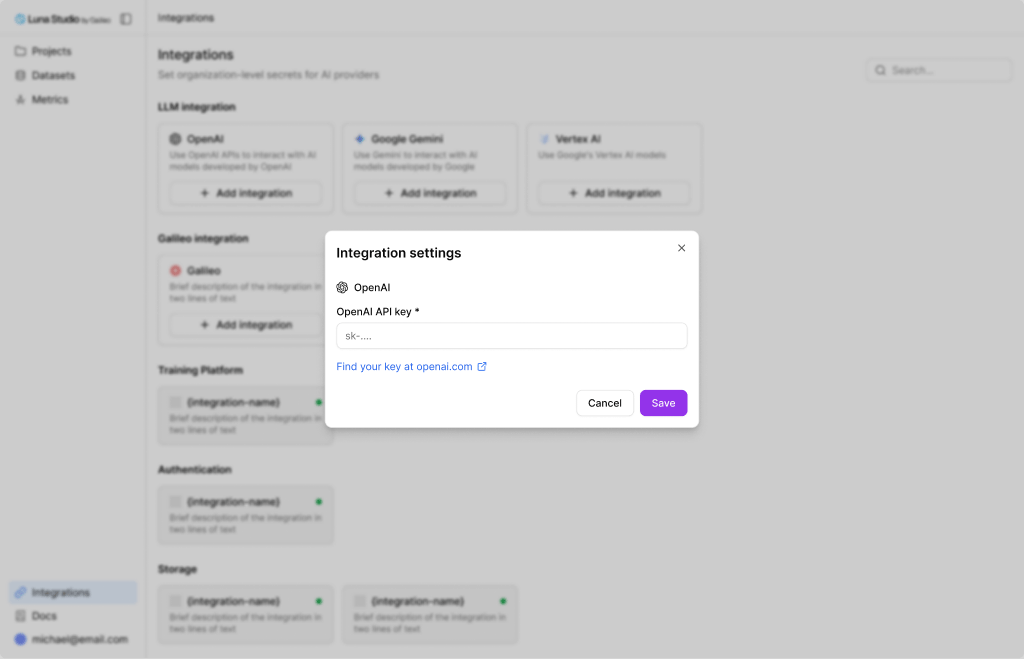
OpenAI
Best for teams using OpenAI directly.
| What you’ll need | Notes |
|---|
| API key | Starts with sk-.... Get it from platform.openai.com/api-keys. |
Anthropic
Best for teams using Anthropic directly.
| What you’ll need | Notes |
|---|
| API key | Starts with sk-ant-.... Get it from console.anthropic.com/settings/keys. |
Mistral
Best for teams using Mistral directly.
| What you’ll need | Notes |
|---|
| API key | Get it from console.mistral.ai. |
NVIDIA
Best when your team already has access to an NVIDIA NIM endpoint.
| What you’ll need | Notes |
|---|
| Hostname | Your NIM endpoint, for example https://nim.example.com. |
| API key | The token used to authenticate to that endpoint. |
Databricks
Best for models exposed through Databricks model serving.
| What you’ll need | Notes |
|---|
| Hostname | Your Databricks workspace URL. |
| API key | A Databricks personal access token. |
Writer
Best for teams using Writer-hosted models.
| What you’ll need | Notes |
|---|
| API key | Required. |
| Organization ID | Optional. Use it if your Writer account spans multiple orgs. |
Vegas Gateway
Best for teams using an internal gateway managed by Galileo.
| What you’ll need | Notes |
|---|
| URL | The gateway endpoint. |
| API key | Authentication token. |
| Use case | Identifier used by the gateway for routing or attribution. |
Azure
Use Azure when your team runs OpenAI models through Azure OpenAI rather than directly through OpenAI.
| What you’ll need | Notes |
|---|
| URL | Your Azure OpenAI resource endpoint. |
| API key | The resource’s primary or secondary key. |
Vertex AI
Use Vertex AI when your team manages Gemini or other models through Google Cloud.
| What you’ll need | Notes |
|---|
| Credentials JSON | The full Vertex AI service-account JSON. |
| File upload support | Optional. Turn this on only if you’ll upload files through Vertex-backed flows. |
For text-only evaluation and training flows, most teams can leave file upload support off.
AWS-hosted models
Use AWS-hosted models when your team serves models through Bedrock or SageMaker.
AWS Bedrock
Bedrock is the simpler AWS option. Once Luna Studio can authenticate to your AWS account and region, it can use the Bedrock models available there.
| What you’ll need | Notes |
|---|
| Access key and secret, or role ARN | Use whichever auth path your AWS team prefers. |
| Region | The AWS region where Bedrock is enabled. |
AWS SageMaker
Use SageMaker when your team serves its own model endpoints in AWS.
| What you’ll need | Notes |
|---|
| Access key and secret, or role ARN | Use whichever auth path your AWS team prefers. |
| Region | The AWS region where your SageMaker endpoints run. |
| Model endpoint details | Luna Studio needs to know which SageMaker endpoint to call for each model you want to expose. |
Custom models and proxies
Use Custom when your model setup does not fit one of the named integrations above.
Common examples:
- an internal LLM gateway
- an OpenAI-compatible proxy
- a self-hosted model endpoint
- a provider Luna Studio does not yet support directly
The Custom integration lets you define one or more models in JSON, including the endpoint, request format, and any headers needed for authentication.
Start with a named provider whenever possible. Use Custom when you need extra flexibility for an internal or unsupported setup.
Update or remove an integration
- Update reopens the integration so you can replace keys, URLs, or other settings.
- Remove deletes that integration from your org. Runs already in progress keep using the credentials they captured at launch.