

Most metrics in Luna Studio come from Galileo presets or custom Galileo metrics. When you need a metric that does not fit an existing option, define a custom LLM-as-judge prompt in Step 1 of the run creation flow.Documentation Index
Fetch the complete documentation index at: https://docs.galileo.ai/llms.txt
Use this file to discover all available pages before exploring further.
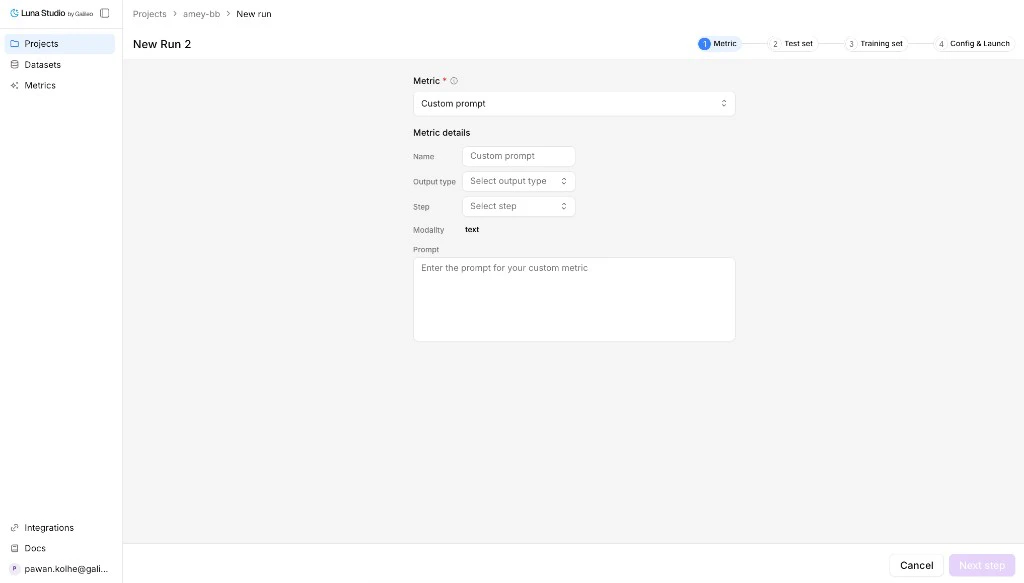
Open custom prompt mode
From Step 1 of the run creation flow, open the metric dropdown and click Use custom prompt.Fields
| Field | Required | Notes |
|---|---|---|
| Metric name | No | Optional display name. If blank, Luna Studio derives one from the run context. |
| Output type | Yes | The trainable return shape: Boolean or Categorical. |
| Step | Yes | The trace step the metric runs against: LLM span, Retriever, Agent span, Trace. |
| Input step | Yes | Training input shape: Single message, Input / output pair, Full trace, or Full session. |
| Modality | — | Read-only. Fixed to Text today. |
| Prompt | Yes | The LLM-as-judge prompt. Required. |
Output types in detail
| Output type | When to use |
|---|---|
| Boolean | Yes/no questions (“Is this toxic?”, “Does the answer cite a source?”). |
| Categorical | Picking one of a fixed list (e.g. positive / neutral / negative). |
Steps in detail
| Step | Where it fires |
|---|---|
| LLM span | A single LLM call inside a trace. The default and most common. |
| Retriever | A retrieval step (e.g. evaluating chunk relevance). |
| Agent span | A single agent step inside a trace. |
| Trace | The full trace — input, intermediate steps, and final output. |
Input steps
| Input step | When to use |
|---|---|
| Single message | One text input per row. |
| Input / output pair | Rows that include both the prompt/input and model output. |
| Full trace | Trace-level metrics that need the full request flow. |
| Full session | Session-level metrics that need multiple related traces. |
Prompt-writing tips
- Be specific. Define exactly what counts as a positive vs negative result.
- Give examples. One or two short examples per outcome class is plenty.
- Constrain the output. End the prompt with something like “Respond with only
trueorfalse.” for Boolean metrics. - Avoid open scales. “Score 1–10” is harder for an LLM-judge to keep consistent than a binary or 3-class categorical.
Submit
Continue through the run creation flow. Luna Studio saves the metric definition with the run and fine-tunes it once you launch.Designing outside Luna Studio
Use the standalone Galileo metrics workflow when you want to design and test a metric outside of Luna Studio before bringing it into a run.Where to go next
Step 1: Metric (in the run creation flow)
Define a custom metric inside a new run.
Test sets
Schema rules and best practices for evaluation data.
Register a metric
Publish a fine-tuned metric to Galileo.