

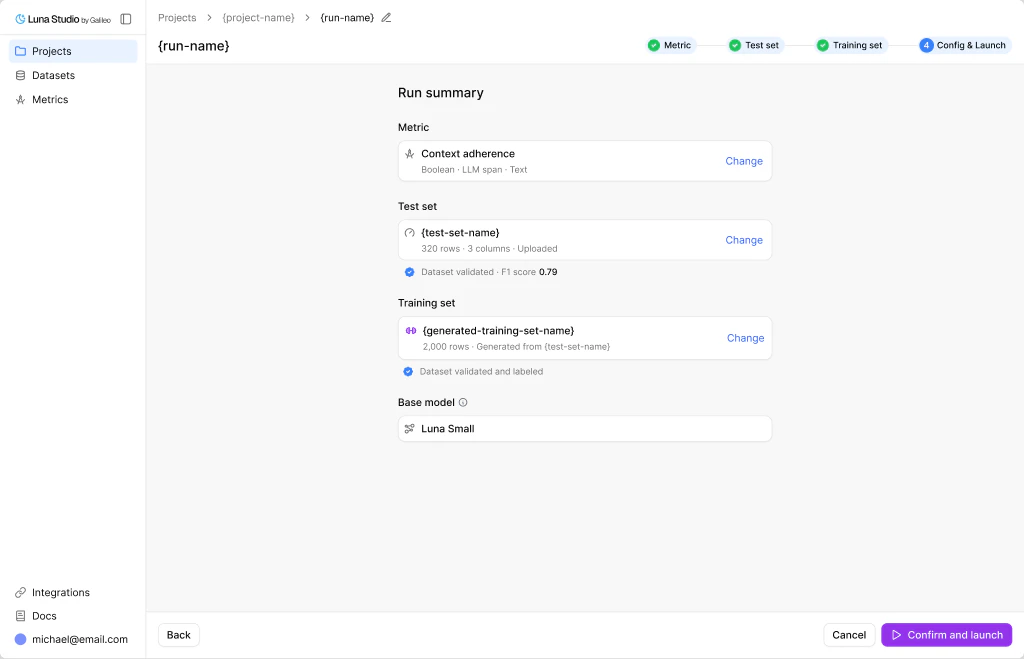
Step 4 — Check your run summary and launch
Run summary
The page is titled Run summary with one card per artifact:
Each card has a Change link in the top right that jumps you back to that step.
Confirm and launch
When you click the Confirm and launch button, the run is submitted to Luna Studio and the following happens:- Saves the run with status Queued.
- Allocates training resources for the picked base model.
- Begins fine-tuning on the training set.
- Evaluates the resulting metric against the test set.
- Transitions the run to Fine-tuned (or Failed).
Where to go next
Run lifecycle
Understand training, registration, failure, and cancellation states.
Register a metric
Once an eligible run is Fine-tuned, publish it.
Troubleshooting
What to do if a run fails.